Creator Field Manual: Curriculum Architecture, Code Sandboxes, Quizzes, Certifications & Distribution Protocol
Overview
The Creator Operating Perimeter in BinaryBase Academy is the sovereign infrastructure for technical educators, software architects, and instructional engineers. On BinaryBase Academy, Creators maintain the widest operational footprint across the ecosystem: you have complete authority to architect end-to-end curriculums, author interactive coding sandboxes, deploy formative quizzes, manage student cohorts, and mint verifiable digital graduation certificates.

Furthermore, Creators enjoy 100% full capability parity with Digital Artifact Vendors. Every capability available to platform vendors, including multi-part deliverable packaging, in-browser Secure Engine DRM, Paystack automated split payouts, custom promo coupon engines, and the real-time Prospect Intelligence CRM, is natively unlocked within your Creator Command Centre.
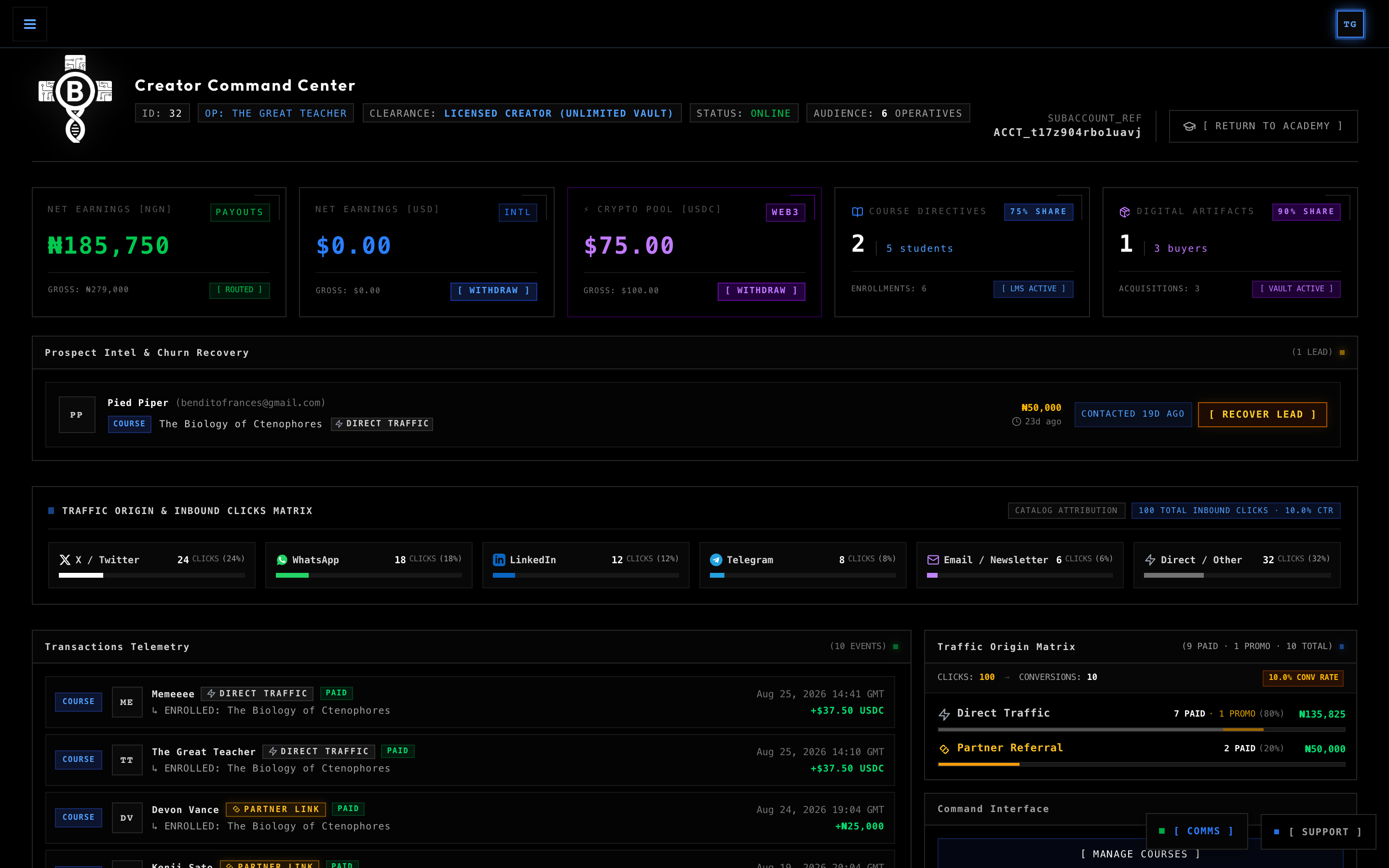
Whether you are teaching low-level systems programming in Rust and Go, deploying zero-latency WebAssembly sandboxes for data analysis in Python, or distributing production architecture blueprints alongside your video masterclasses, this manual outlines every technical workflow, security perimeter, and pedagogical tool at your disposal.
1. Creator System Architecture & Pedagogical Topology
The Creator Subsystem orchestrates course structure, video ingestion, real-time code execution, assessment verification, digital artifact packaging, automated split settlements, and cryptographic certificate minting across seven coordinated layers:
The 4-Level Pedagogical Hierarchy
BinaryBase organizes technical curriculums into four clear, nested tiers:
- Course Level: The overarching technical directive (e.g., "The Biology of Ctenophores" or "Topological Quantum Architectures"). Governs public metadata, cover branding, dual pricing (NGN/USD), affiliate revenue share settings, and graduation certificate issuance.
- Module Level: Logical structural milestones (e.g., "Module 1: Basal Synapse Matrix", "Module 2: Bioluminescence Pathways"). Groups related lessons into progressive learning chapters.
- Lesson Level: The core delivery unit. Combines high-definition video masterclasses (streamed over adaptive HLS), rich-text instructional notes, downloadable resources, and attached interactive labs or quizzes.
- Assessment & Sandbox Level: Hands-on evaluation. Lessons can culminate in an Interactive Code Lab (with automated test suites) or a Formative Quiz (with multiple-choice knowledge checks).
2. Creator Onboarding & Identity Architecture
Before publishing courses or receiving payouts, Creators complete a straightforward onboarding process to set up their instructor profile, payout preferences, and certificate signature.
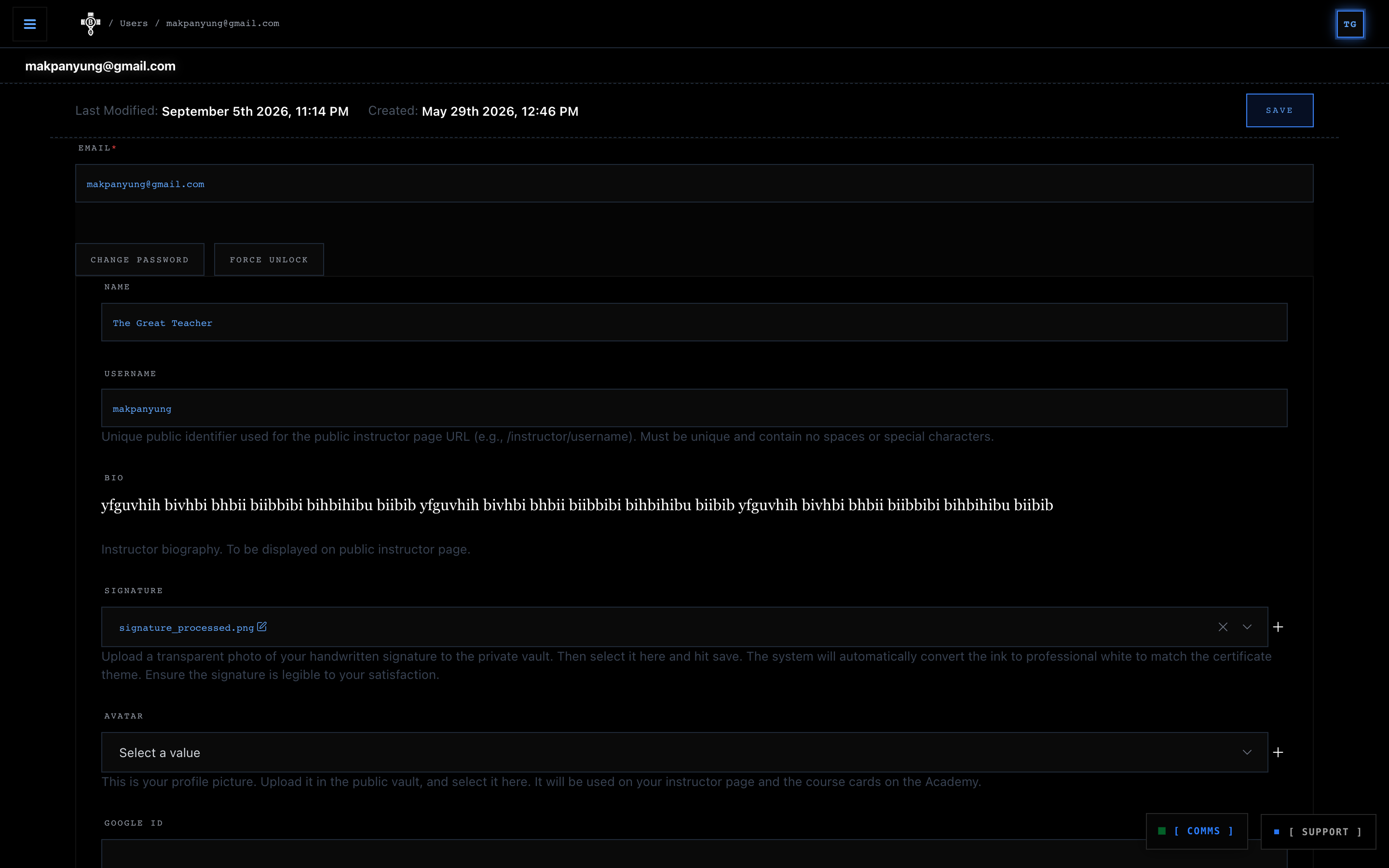
1. Instructor Handle & Public Profile
Every Creator is assigned a unique username handle (e.g., peter-pan), generating a public instructor directory page at:
https://academy.binarybase.systems/instructor/[username]Your public profile showcases your verified bio, your full catalog of published courses, your digital artifacts, student enrolment counts, and verified learner ratings.
2. The Vector White-Ink Stamping Engine
Every graduation certificate issued to students who complete your courses bears your official handwritten signature. To ensure flawless rendering across dark-themed certificates, BinaryBase utilizes an automated High-Contrast White-Ink Stamping Pipeline:
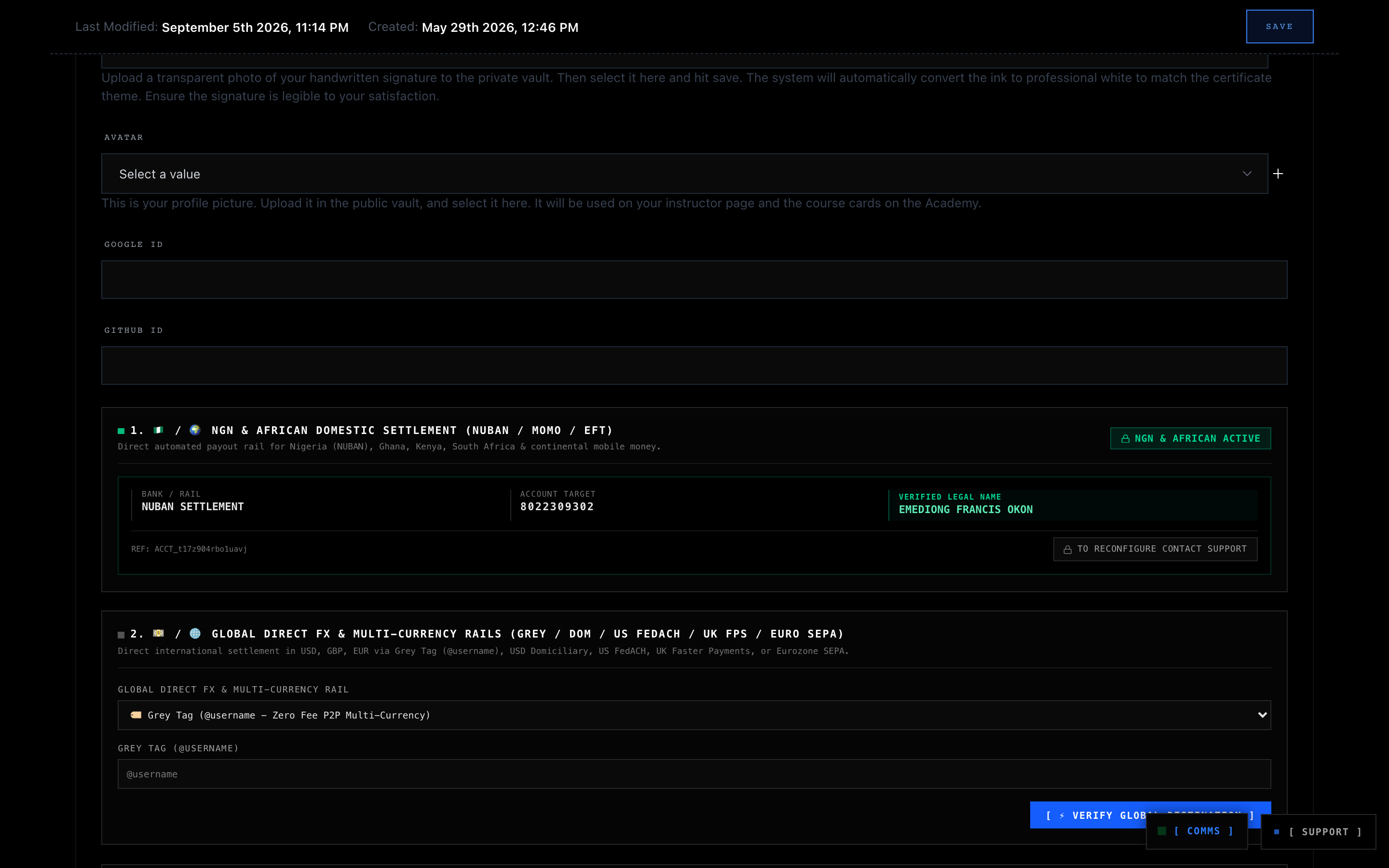
- Sign and Capture: Sign clearly using a dark pen on a clean sheet of white paper, and take a sharp, well-lit photograph or scan of your signature.
- Remove the Background: Use an image editor or background removal tool to strip the paper background completely, leaving only your signature strokes on a transparent background (saved as a PNG file).
- Upload Transparent Signature: Upload the transparent PNG directly into the Signature field in your account settings.
- Automated Inversion & Certificate Stamping: The platform's engine automatically converts your signature strokes into high-contrast white ink (
#FFFFFF) and permanently stamps it onto student graduation credentials alongside the verification QR code.
3. Paystack Subaccount Verification & Automated Payout Rails
BinaryBase Academy operates on real-time subaccount split payouts powered by Paystack:
- NIBSS Bank Verification: When entering your 10-digit NUBAN and bank code, the system performs a live 2-step verification against the Nigerian Inter-Bank Settlement System (NIBSS) to resolve your account name.
- Automated Revenue Split: Platform splits are mathematically computed at checkout:
- Courses: 75% Creator / 25% Platform.
- Digital Artifacts: 90% Creator / 10% Platform (full vendor parity).
- Affiliate Assisted: The affiliate receives their designated commission (e.g., 25%), and the remaining revenue splits proportionately.
- Direct Payouts: Settled funds are routed directly by Paystack into your verified bank account without manual platform intervention.
4. Hardware Biometric Passkey Security (Touch ID, Face ID, Windows Hello)
Protecting your creator profile, publishing authority, and payout banking details is essential. BinaryBase Academy integrates hardware-grade biometric authentication directly into your account settings:
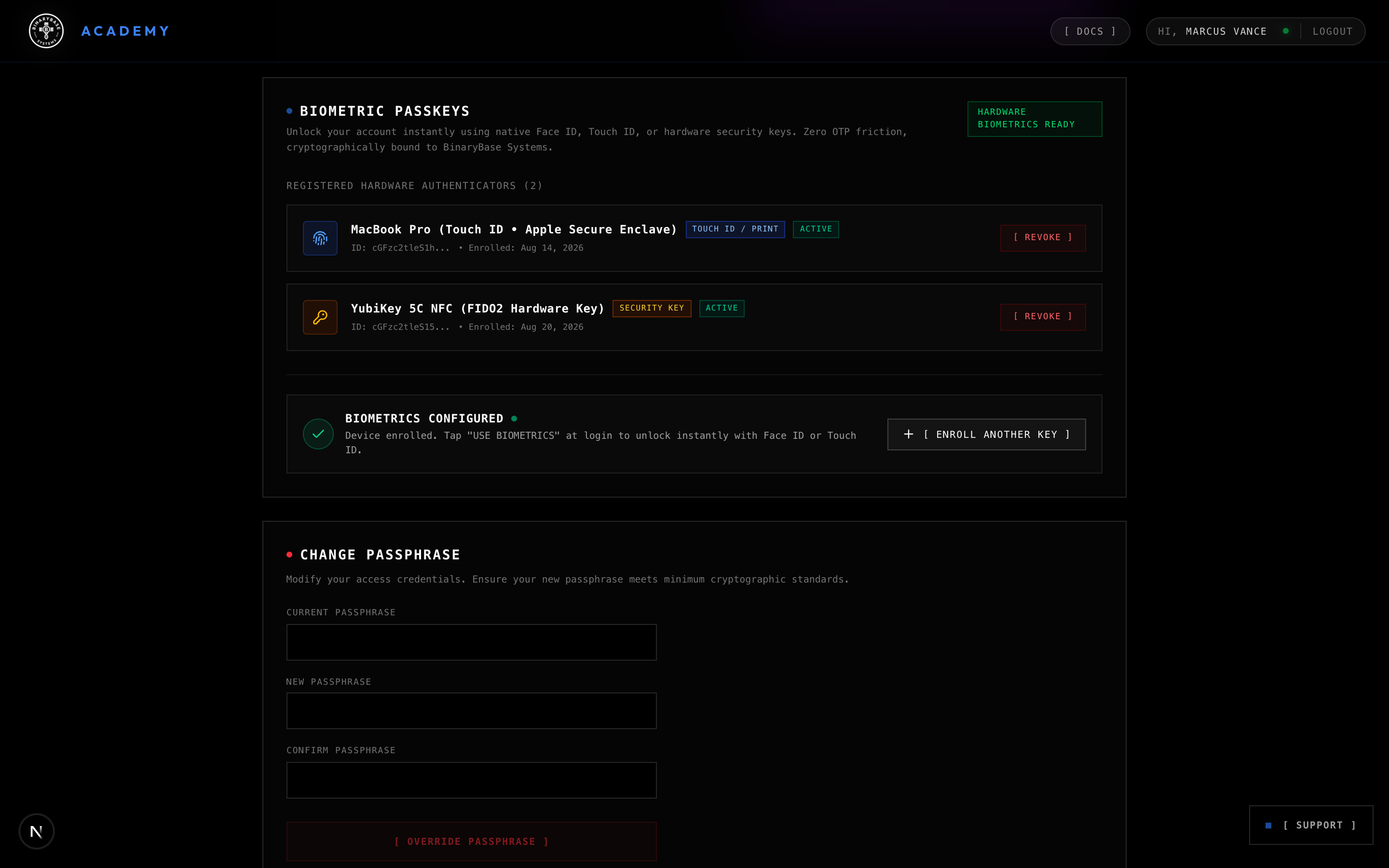
- 1-Tap Biometric Enrollment: Configure your device's built-in authenticator (such as Touch ID on macOS, Face ID on iPhones/iPads, Fingerprint on Android, or Windows Hello on PC), as well as physical USB security keys (like YubiKey). All passkeys are cryptographically bound to BinaryBase Systems.
- Device-Aware Hardware Recognition: The enrollment terminal intelligently identifies your operating system and sensor architecture, ensuring seamless configuration without confusing prompts.
- Effortless Instant Sign-In: Once enrolled, you can unlock your Creator Command Centre in seconds using Unlock with Biometrics on the sign-in terminal, completely bypassing traditional passwords.
- Safe Revocation: If you replace or retire a device, you can revoke its credential instantly from your account settings with a single click.
3. Course Curriculum Engineering
The Course Curriculum Editor allows you to configure global course parameters, pricing tiers, affiliate recruitment terms, and hierarchical module associations.
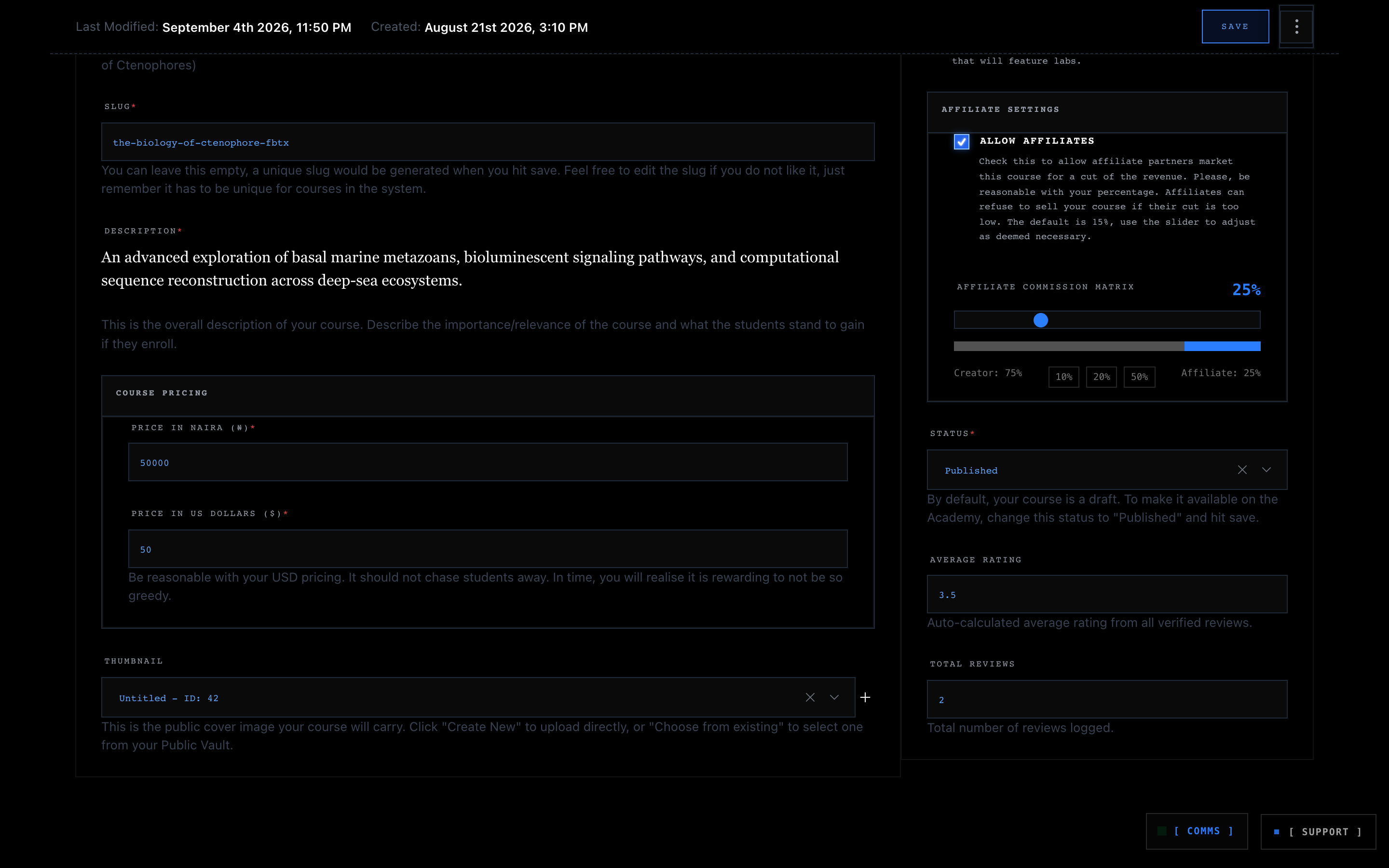
Course Creation Configuration Parameters
- 🏷️ Title & Slug: High-level course title and URL handle, generated automatically from title (e.g.
/course/the-biology-of-ctenophores-fbtx). - 📝 Description: Rich-text overview and comprehensive syllabus rendered on the public course landing page for prospective students.
- 💳 Dual Pricing Matrix:
price(NGN) &priceUSD(USD), enabling localised domestic checkout via Paystack and international card payments. - 🤝 Affiliate Matrix:
allowAffiliatestoggle & slider (10%–50%), unlocking your course in the Affiliate Marketplace for external marketing partners. - 🚀 Publish Status:
draftvspublished, controlling visibility across the Academy public catalogue and search index.
4. High-Definition Video Ingestion & Streaming Infrastructure
Video lessons are delivered over an enterprise Content Delivery Network utilising resilient, resumable chunked uploads and multi-quality adaptive video streaming.
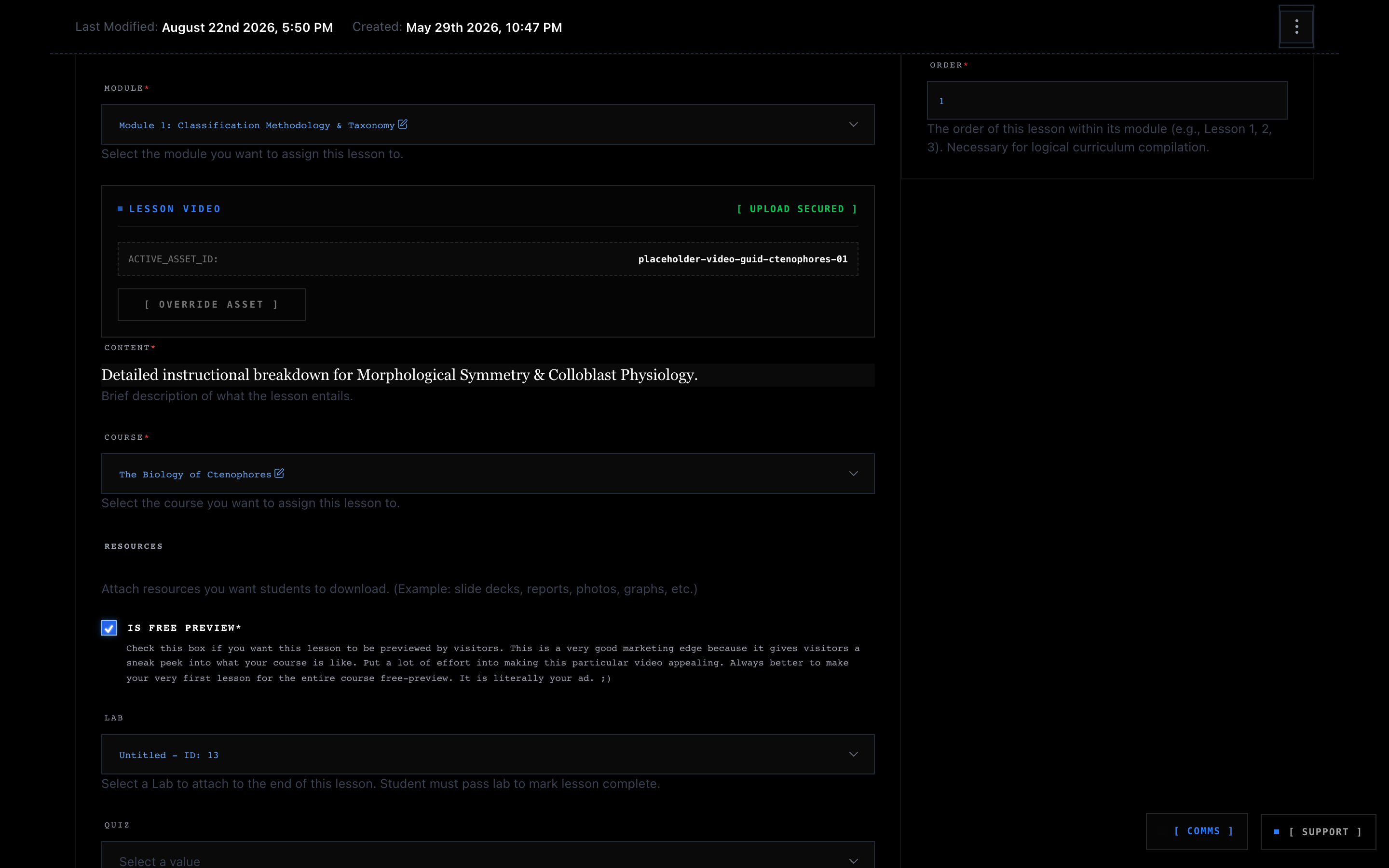
1. Resumable Chunked Ingestion
When uploading masterclass recordings in the Lesson Editor:
- The browser securely initializes upload authentication and establishes encrypted upload parameters.
- The
VideoUploaderautomatically splits large video files (MP4, MOV, MKV) into 5MB chunks and transmits them sequentially. - If network connectivity is interrupted during an upload, transfers resume automatically from the exact last byte transferred without starting over.
2. Adaptive Bitrate Transcoding & Encrypted Playback
Once uploaded, raw video assets are encoded into multi-quality adaptive streams (1080p, 720p, 480p, 360p):
- Ephemeral Security Grants: When an enrolled student opens a video lesson, the player securely obtains a 60-second time-bounded playback grant verified against their enrollment status.
- DRM Protection: Video chunks are served over encrypted HTTPS pipelines. Direct file URLs cannot be copied or shared outside active enrolled sessions.
- In-Browser Player: Features playback speed manipulation (0.75x to 2.0x), manual/automatic resolution switching, and full-screen theatre mode.
5. Interactive Coding Sandbox & Autonomous AI Scaffolding
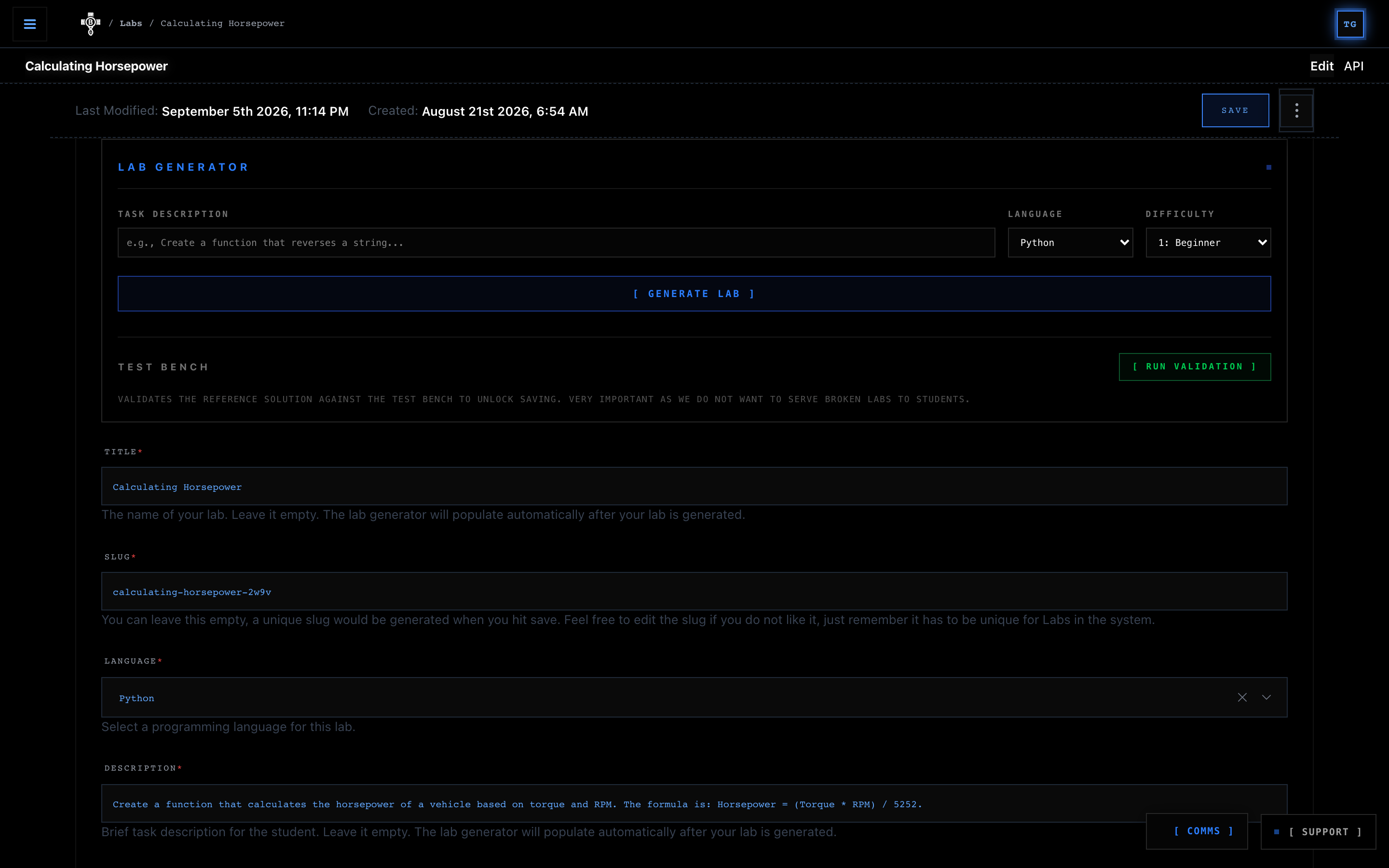
BinaryBase Academy provides students with an in-browser cloud developer environment. To make challenge design effortless, Creators primarily utilise the built-in Autonomous AI Lab Scaffolder to generate complete interactive labs in seconds, with optional manual fine-tuning available whenever needed.
5.1 Dual Execution Environments & Runtime Architecture
BinaryBase orchestrates code execution across two isolated computing tiers depending on the language runtime:
- Compute Sandbox (`Compute`):
- Supported Language:
Python 3.11 - Execution Engine: Client-side in-browser WebAssembly (Pyodide Worker)
- Runtime Characteristics: Runs inside an isolated browser thread. Zero OS-level processes (no
subprocessoros.fork). Instantaneous client-side execution and evaluation.
- Supported Language:
- StateOS Sandbox (`StateOS`):
- Supported Languages:
Go,Rust,C++,TypeScript,JavaScript,PHP,Ruby,Bash - Execution Engine: Server-side edge-isolated micro-containers
- Runtime Characteristics: Ephemeral backend micro-containers. Compiles and executes self-contained single-file source code using standard library toolchains.
- Supported Languages:
5.2 Autonomous AI Lab Scaffolding Workflow
- Task Objective: Provide a concise prompt describing the lab challenge (e.g.,
"Implement Kadane's Algorithm in Go to calculate the maximum contiguous subarray sum from CLI arguments"). - Language & Difficulty: Select the target language runtime (
Go,Rust,Python,C++, etc.) and difficulty tier (Beginner,Intermediate,Advanced). - Trigger AI Generation: Click
[ GENERATE LAB ]. The scaffolding engine automatically prepares the complete lab workspace for you:- Student Starter Code: Clean boilerplate with docstrings, type signatures, and
TODOmarkers indicating where learners should write code. - Reference Solution: A fully implemented, production-quality solution file used to verify the challenge.
- Validation Test Suite: An automated test harness containing unit tests, assertions, and edge case evaluations.
- Required Packages: Standard library and external package dependencies configured for the runtime.
- Student Starter Code: Clean boilerplate with docstrings, type signatures, and
5.3 The Two Categories of Lab Algorithms
When prompting the Lab Generator Engine, algorithmic challenges generally fall into two distinct operational categories:
A. Pure / Stateless Labs (Zero Configuration Required)
- Examples: String manipulation, Fibonacci sequences, Merkle Trees, Binary Search, Sorting Algorithms, Data Serialization, Mathematical Proofs, Regex matchers.
- Characteristics: Output is a direct mathematical function of the input:
f(x) = y. - Prompting Style: High-level descriptions work out-of-the-box on the first generation pass.
- Example Prompt:
"Create a Go CLI tool that takes a list of integers and outputs their contiguous subarray with the largest sum (Kadane's Algorithm)."
B. Stateful / Simulation Labs (The Deterministic State Protocol)
- Examples: Token or Leaky Bucket Rate Limiters, LRU/LFU Caches, State Machines, Virtual Memory Simulators, TCP Sliding Window buffers, Game Loops, Banking Ledger transactions.
- Characteristics: Output at step
Ndepends strictly on the remaining state from previous steps1 to N-1(mutable state, clock deltas, accumulator thresholds, eviction policies).
Important Protocol for Stateful Labs: In stateful simulations, you must explicitly define the baseline initial conditions (e.g., initial capacity C = 1, clock epoch t = 0, refill intervals) or provide a concrete reference trace. If initial conditions are left to assumption, the reference code and validation assertions may calculate different edge-case deltas (e.g., whether a token bucket starts full or empty, or whether time begins at 0 vs the first request timestamp).
5.4 Golden Prompting Patterns for Complex & Stateful Labs
Pattern 1: The Explicit Initial Condition Pattern (Rate Limiters & Buffers)
Clearly declare:
- Starting State: Explicitly declare initial values (e.g.,
"Bucket starts full with capacity C = 1"or"Cache starts empty with max entries K = 3"). - Delta Metric: Define step or clock increments (e.g.,
"1 token per 1000ms"). - Canonical Example Trace: Give one concrete sequence of operations and expected outputs.
Example Prompt (Rate Limiting in Rust / Go / Python):
Create a Rust CLI tool implementing a discrete Token Bucket Rate Limiter using only the standard library.
- Initial State: Capacity = 1 token, refill rate = 1 token per 1000ms.
- Input Arguments: Accept zero or more '--request <timestamp_ms>' queries.
- Evaluation: For each request, calculate elapsed ms since the previous request, add refilled tokens (capped at capacity). If tokens >= 1.0, consume 1.0 and allow (true); else deny (false).
- Example: For '--request 1000 --request 1500 --request 2000', output '[true, false, true]'.
Pattern 2: The Invariant Property Pattern (Caches & Data Structures)
Rather than asserting on fragile global strings, instruct the test bench to evaluate specific behavioural invariants (e.g., capacity eviction rules, cache hits vs misses).
Example Prompt (LRU Cache in C++ / Rust / TypeScript):
Create a C++ lab implementing a Generic LRU Cache with capacity K.
- Methods: put(key, value) and get(key).
- Eviction: When size exceeds K, evict the least recently used key.
- Validation: Test inserting K elements, accessing the oldest element to make it most recent, inserting a (K+1)-th element, and verifying that the second-oldest element was the one evicted.
5.5 Catalog of Prompting Quirks & Edge Cases
⚠️ Quirk 1: Stateful Simulations & Initial Conditions (The Rate Limiter / Cache Trap)
- The Quirk: In algorithms with time accumulation (e.g., Token/Leaky Bucket, sliding window counters, LRU eviction), if initial capacity or time delta units are ambiguous, the generated Reference Solution may calculate elapsed time from
t = 0(e.g.,1000ms - 0ms) while the Validation Script calculates from the first request (e.g.,1000ms - 1000ms), causing boolean discrepancies ([true, true, true]vs[true, false, true]). - The Rule: Pin the initial state and reference trace.
- ❌ Weak Prompt:
"Create a Token Bucket Rate Limiter with capacity 2 and refill rate 1." - ✅ Strong Prompt:
"Create a Token Bucket Rate Limiter with capacity 1 token, refill rate 1 token per 1000ms. Bucket starts full. For requests at 1000ms, 1500ms, 2000ms, output '[true, false, true]'."
- ❌ Weak Prompt:
⚠️ Quirk 2: Case Normalisation in String Algorithms (The Fuzzy Trie Trap)
- The Quirk: If a lab mentions word search, fuzzy matching, or parsing without specifying case behaviour, the student solution might perform
.lower()normalisation while the test bench queries with original or uppercase casing, returning empty sets (set()). - The Rule: Explicitly state case sensitivity.
- ❌ Weak Prompt:
"Implement a search trie that finds words within distance 1." - ✅ Strong Prompt:
"Implement a search trie for ASCII lowercase words only. All inputs and queries are guaranteed to be lowercase."
- ❌ Weak Prompt:
⚠️ Quirk 3: Standard Library Only / Zero External Dependencies (The Rust/Go Dependency Trap)
- The Quirk: StateOS sandbox containers compile single files directly using toolchains like
rustc main.rsandgo run main.gowithout pulling package manager manifests (Cargo.toml,go.mod). Requesting external third-party crates (e.g.,use sha2in Rust) causes compilation aborts. - The Rule: Specify standard library primitives.
- Rust: Use
std::*only (std::collections,std::env,std::fs,std::io). - Go: Use standard library packages (
crypto/sha256,strings,fmt,os,io). - C++: Use C++ Standard Library headers (
<iostream>,<string>,<vector>,<algorithm>,<sstream>,<unordered_map>).
- Rust: Use
⚠️ Quirk 4: Multi-File vs Single Translation Units (The C++ Header Trap)
- The Quirk: When prompting for C++ or Go, the AI might attempt to split classes across separate header files (
lru.hpp,main.cpp). While BinaryBase's compiler automatically handles inlining intomain.cpp, prompting for self-contained classes produces cleaner starter boilerplate. - The Rule: Instruct self-contained class implementations.
- ✅ Strong Prompt:
"Create a C++ CLI application with a self-contained LRU Cache class inside main.cpp using <unordered_map> and <list>."
- ✅ Strong Prompt:
⚠️ Quirk 5: Deterministic Tie-Breaking (The DP / Substring Trap)
- The Quirk: In dynamic programming problems where multiple valid outputs share the same metric (e.g., multiple longest palindromes of equal length, or multiple longest common subsequences), the Reference Code might return the first occurrence while the test bench expects the last.
- The Rule: Specify tie-breaking behaviour.
- ✅ Strong Prompt:
"...If multiple longest subsequences have the same maximum length, return the first one that appears in the input string."
- ✅ Strong Prompt:
5.6 The Golden Lab Prompt Formula
To ensure a 100% first-pass green test bench across any programming language, structure your prompt using this proven formula:
Strong Lab Prompt = Goal + Language Runtime + Input/Output Contract + Invariants & Edge Cases + Example TraceExample Master Prompt:
Create a Go CLI tool implementing Kadane's Algorithm for Maximum Subarray Sum using only standard library packages ('fmt', 'os', 'strconv').
- Input: Accepts a sequence of space-separated integers from CLI arguments (e.g. 'main -2 1 -3 4 -1 2 1 -5 4').
- Edge Cases: If all numbers are negative, return the single maximum negative number.
- Output: Print the maximum contiguous sum as a single integer (e.g. '6').
5.7 Pre-Flight Test Bench & Safety Tripwire
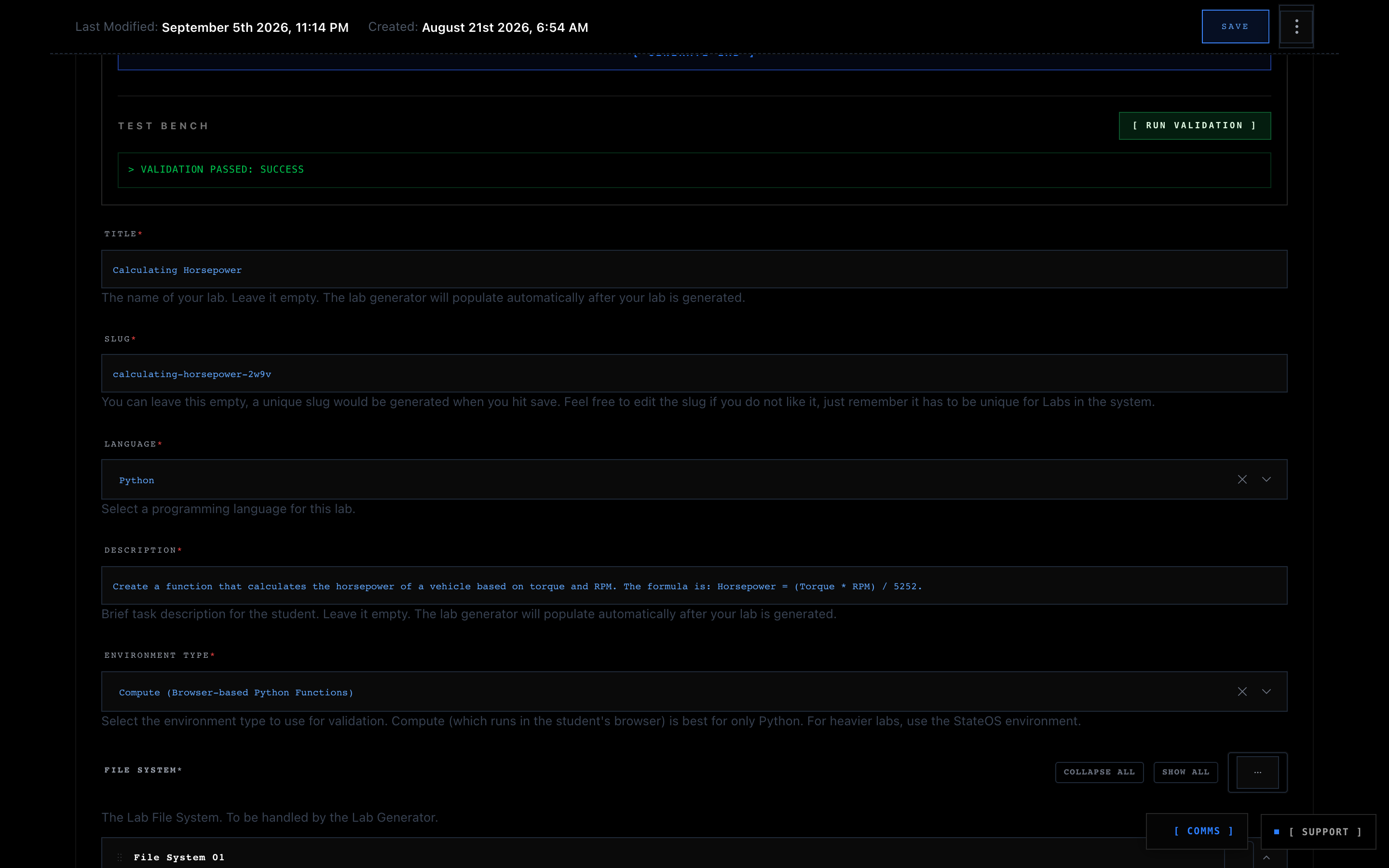
Before any lab is saved to the database or presented to students, BinaryBase enforces a strict Pre-Flight Test Bench safety gate:
- Trigger Scaffolding: Click
[ GENERATE LAB ]. - Review Code Assets: Inspect the generated student starter boilerplate, reference solution, and validation test assertions.
- Execute Verification: Click
[ RUN VALIDATION ]. The test bench compiles and executes the generated Reference Solution against the Validation Test Suite inside the target sandbox runtime. - Automated Verdict:
- 🟢 `VALIDATION PASSED: SUCCESS`: The lab is mathematically sound, the test assertions pass cleanly, and the lab is unlocked for publishing.
- 🔴 `VALIDATION FAILED`: A discrepancy was detected between test assertions and runtime logic. Adjust your prompt parameters or click
[ GENERATE LAB ]again.
- Dirty-State Detection: If you modify any code in the starter boilerplate, reference solution, or test script after validation, the validation status automatically resets, requiring a fresh pre-flight test pass before publishing.
6. Formative Quizzes & Automated Assessment
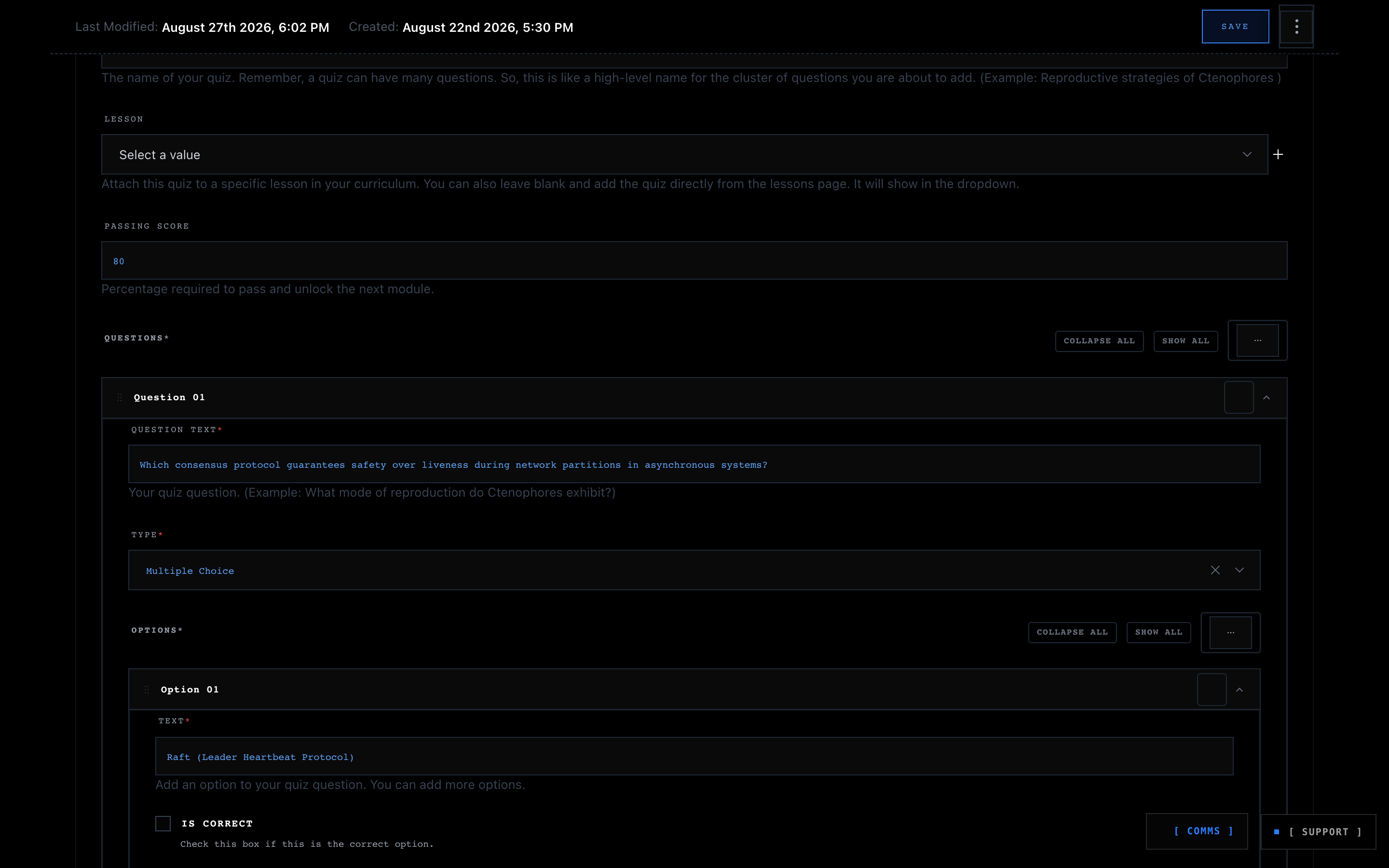
Quizzes allow Creators to conduct structured knowledge checks, reinforce conceptual learning, and test architectural understanding.
Quiz Construction Protocol
- Title & Passing Score: Set a descriptive quiz title and define the required passing threshold (default:
70%–80%). - Question Matrix: Add multiple-choice or true/false questions.
- Options & Correct Answers: Add selectable answer options and check the box corresponding to the correct answer.
- Remediation Explanations: Provide comprehensive technical explanations for why the correct answer is right. When students complete a quiz, the system displays this explanation to solidify retention.
- Lesson Binding: Attach the quiz to specific lessons in your curriculum. Students must pass the attached quiz to mark the lesson complete and progress toward graduation.
7. Digital Artifact Packaging & Secure DRM Vault (Vendor Parity)
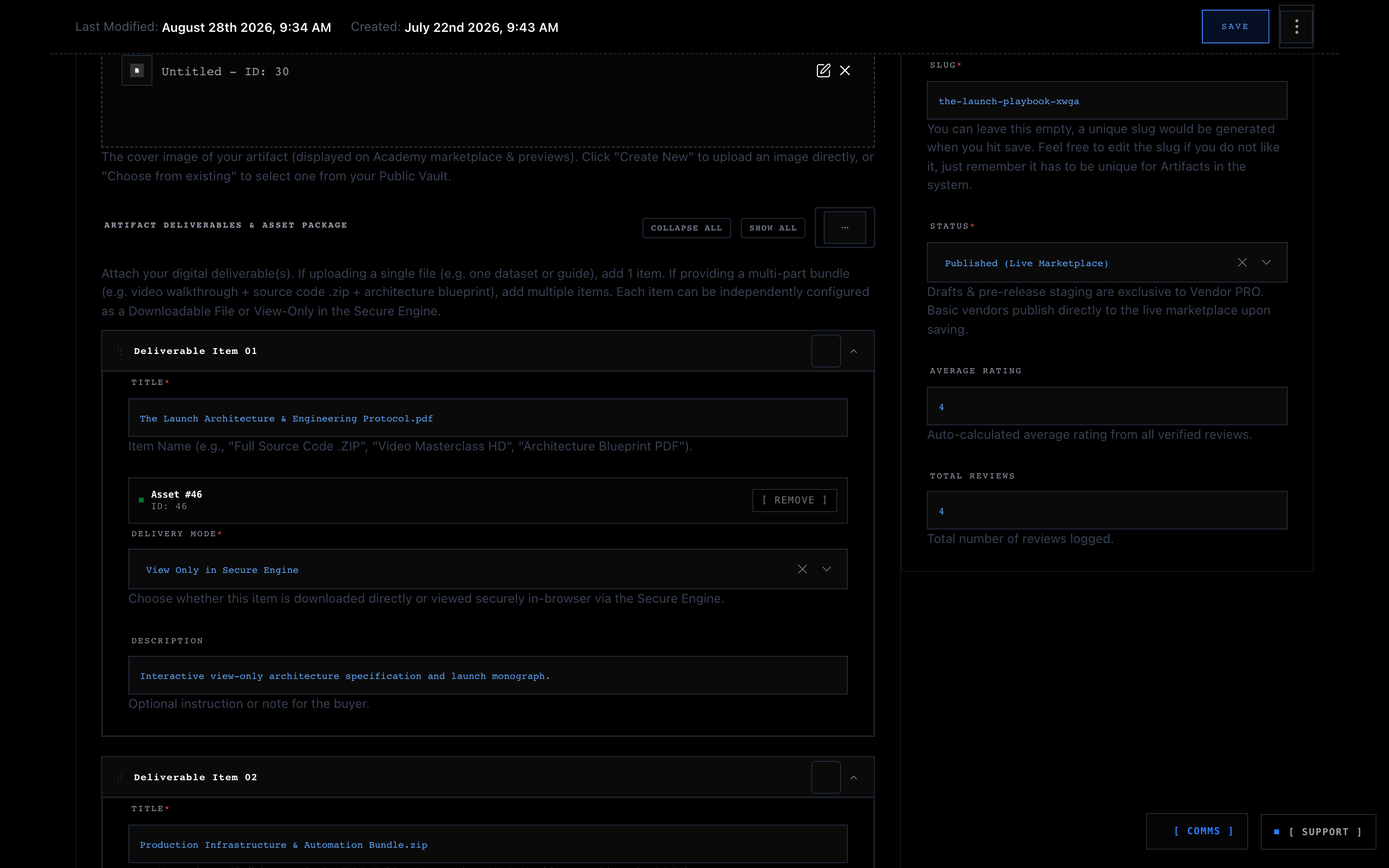
In addition to interactive courses, Creators have full access to BinaryBase's Digital Artifact Arsenal. You can distribute standalone software templates, infrastructure blueprints, and technical eBooks, or package them as companion assets for your courses.
Multi-Part Deliverables & Dual Delivery Modes
Each artifact can bundle multiple distinct files, each configured with its own delivery protocol:
- Direct Download (`download`): For source code archives (
.zip,.tar.gz), CLI binaries, or Docker compose bundles that learners download directly to their local workstations. - View Only in Secure Engine (`view_only`): For high-value proprietary documentation, architecture blueprints (
.json,.pdf,.docx), or monographs that you want protected against unauthorised downloading.
In-Browser Secure Engine DRM & Forensic Watermarking
When a learner opens a view_only deliverable, it renders exclusively within BinaryBase's Zero-Trust Secure Engine in-memory sandboxed document visualizer:
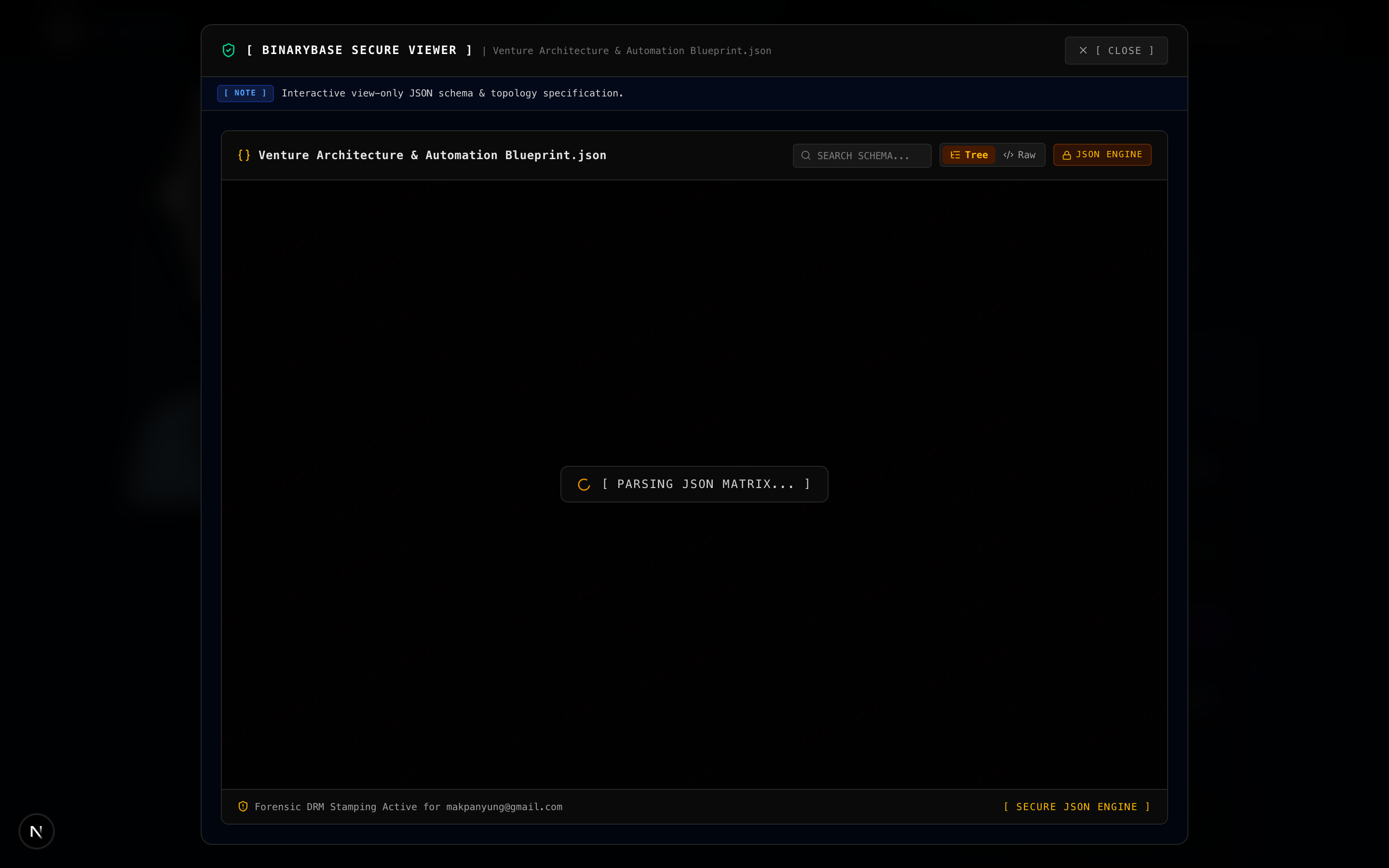
- Interactive Parsers: Features built-in zero-trust viewers for JSON schemas, AST trees, Markdown documents, DOCX files, and PDFs.
- Dynamic Forensic Watermarking: A high-density diagonal watermark displaying the authenticated buyer's email address and clearance timestamp is rendered continuously across the canvas. For video lessons and masterclasses, dynamic quadrant rotation automatically shifts the watermark across screen coordinates to defeat static cropping or screen recording masks.
- Tamper Immunity: Client-side DOM mutation observers instantly blank the screen if developer tools or unauthorised browser extensions attempt to alter or strip the watermark layer.
8. The Live Webinar Studio Transmission Engine (Cohort Masterclasses & 1-on-1 Mentorship)
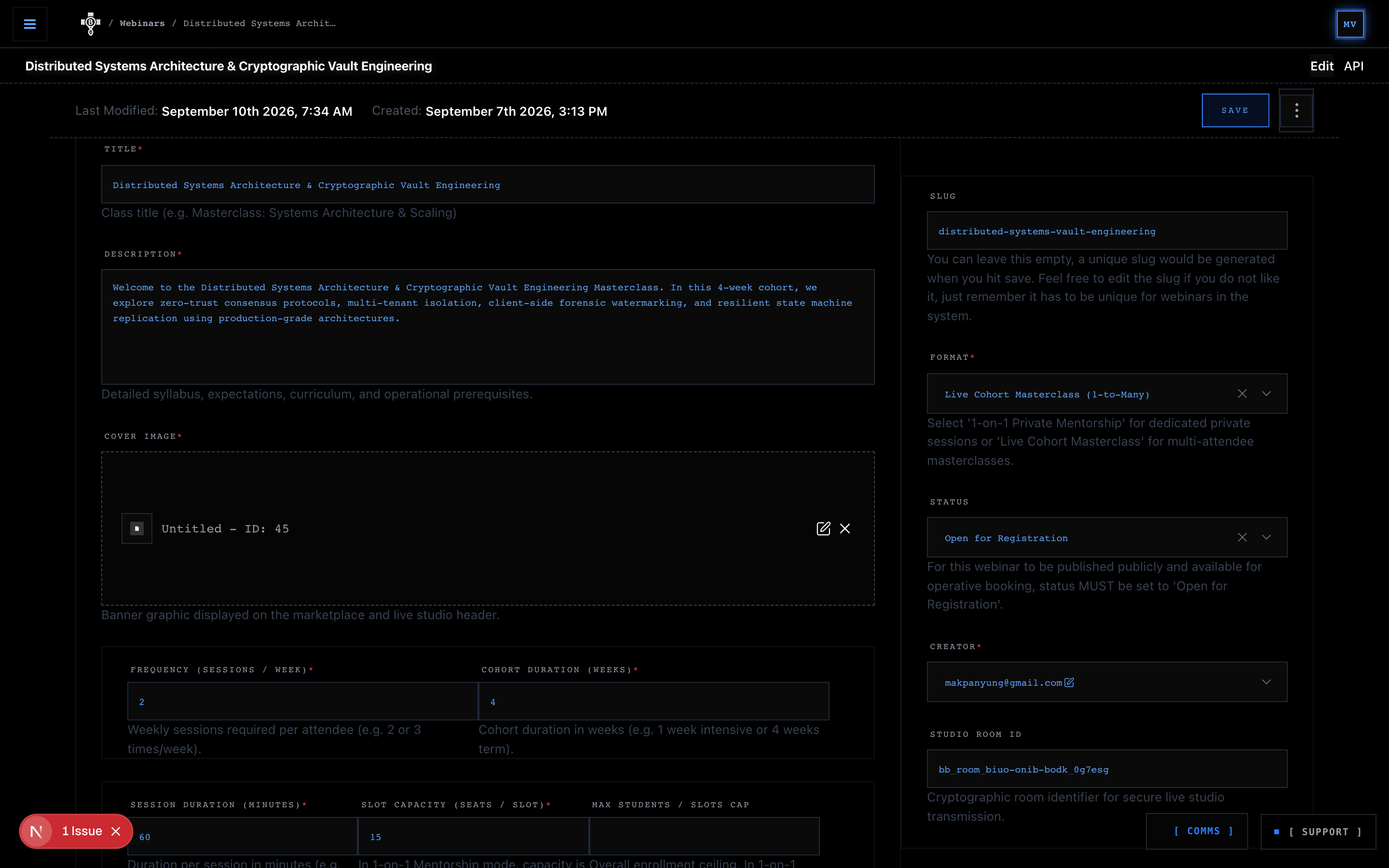
BinaryBase Academy provides an institutional-grade live video transmission studio engineered specifically for technical educators. Beyond asynchronous video lessons and sandboxes, you can schedule and host live interactive cohort masterclasses and intimate 1-on-1 architecture mentorship sessions.
8.1 Session Typologies & Flexible Formats
Creators can provision live webinar studios across two operational formats:
- Cohort Group Masterclasses: Designed for interactive group workshops, deep-dive architectural code walks, and live system design masterclasses.
- 1-on-1 Mentorship Sessions: Tailored for private technical consultations, portfolio/code reviews, and personalized career guidance, with scheduled occurrence calendars and automated Google Calendar invites.
8.2 Transmission Architectures: Interactive Studio vs Broadcast Mode
The studio supports two transmission modes depending on your audience scale:
- Interactive Encrypted WebRTC Studio (Default): Full real-time bi-directional video, crisp audio, native screen sharing, and adaptive tile views. Attendees can raise their hand to speak, join on video, and engage directly.
- High-Capacity Live Broadcast: For open-access seminars and large-scale masterclasses with massive audiences, instructors can switch to high-capacity live broadcast mode. The studio delivers an optimized, low-latency viewing experience for unlimited concurrent learners while keeping platform tactical chat and companion artifact docking fully active.
8.3 The Host Command Center HUD
When you launch your studio (/webinars/[slug]/live/[bookingId]), you enter an encrypted tactical HUD designed for effortless session governance:
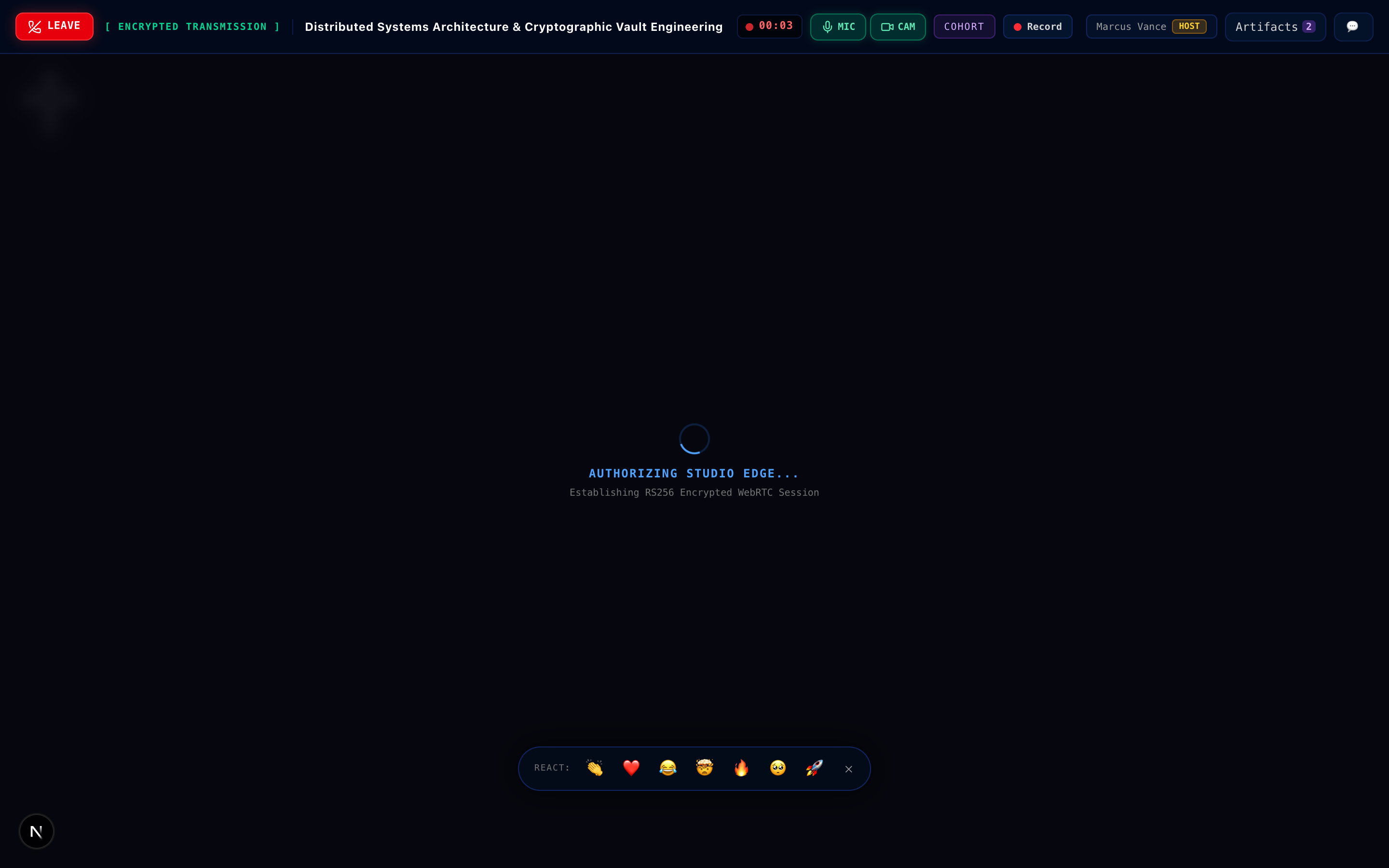
- Native Hardware AV Overrides: Positioned directly in the top HUD bar, dedicated Microphone and Camera toggle switches allow you to mute/unmute and toggle your camera instantly. These controls communicate directly with the underlying media stream via postMessage, guaranteeing reliable hardware toggles even if mobile browser touch events freeze or lag.
- High-Visibility Session Termination (`LEAVE`): The top bar features a prominent crimson hang-up button. Clicking
LEAVEexecutes a clean WebRTC tear-down before safely returning you to your Command Centre, preventing lingering ghost sessions. - Desktop Session Recording Engine: On desktop browsers, hosts can record the masterclass with a single click (
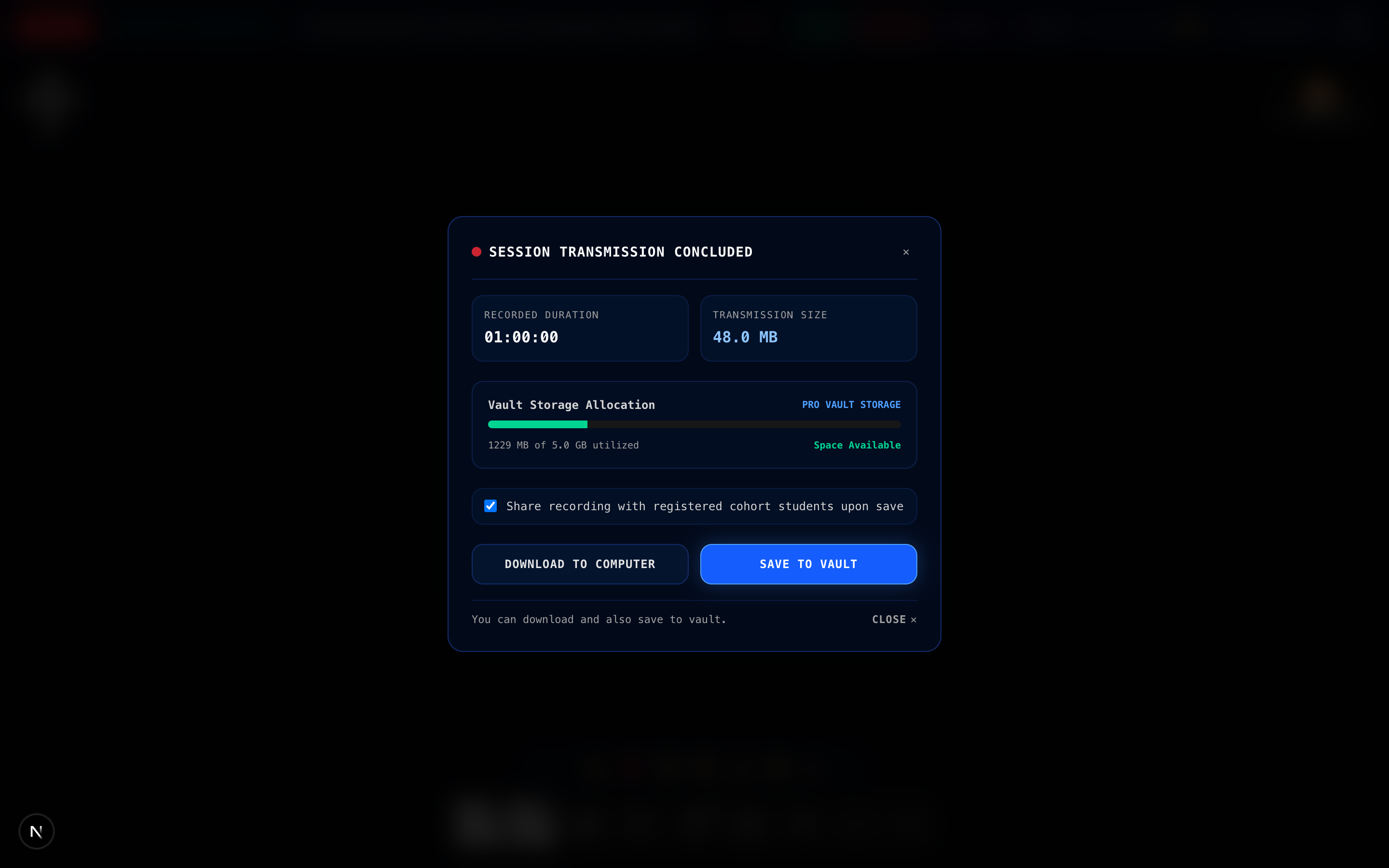
[ Record ]). The engine captures high-fidelity audio and video directly into a secure browser-side recording. When you stop recording, the Post-Session Recording Vault appears, allowing you to download the video file directly to your local drive and/or save it to your platform cloud vault. You can also tick the checkbox to automatically share the recording with all enrolled cohort attendees.
- In-Studio Interactive Polls: Keep your learners engaged by launching real-time polls directly inside the studio. Propose system architecture choices or check conceptual understanding; attendees can vote instantly from their mobile or desktop devices while you inspect live percentage tallies.
- Synchronized Tactical Chat: The in-studio chat drawer lets you converse with your cohort in real time without intrusive popups. Incoming messages from both mobile and desktop attendees are seamlessly cross-synchronized alongside live participant presence.
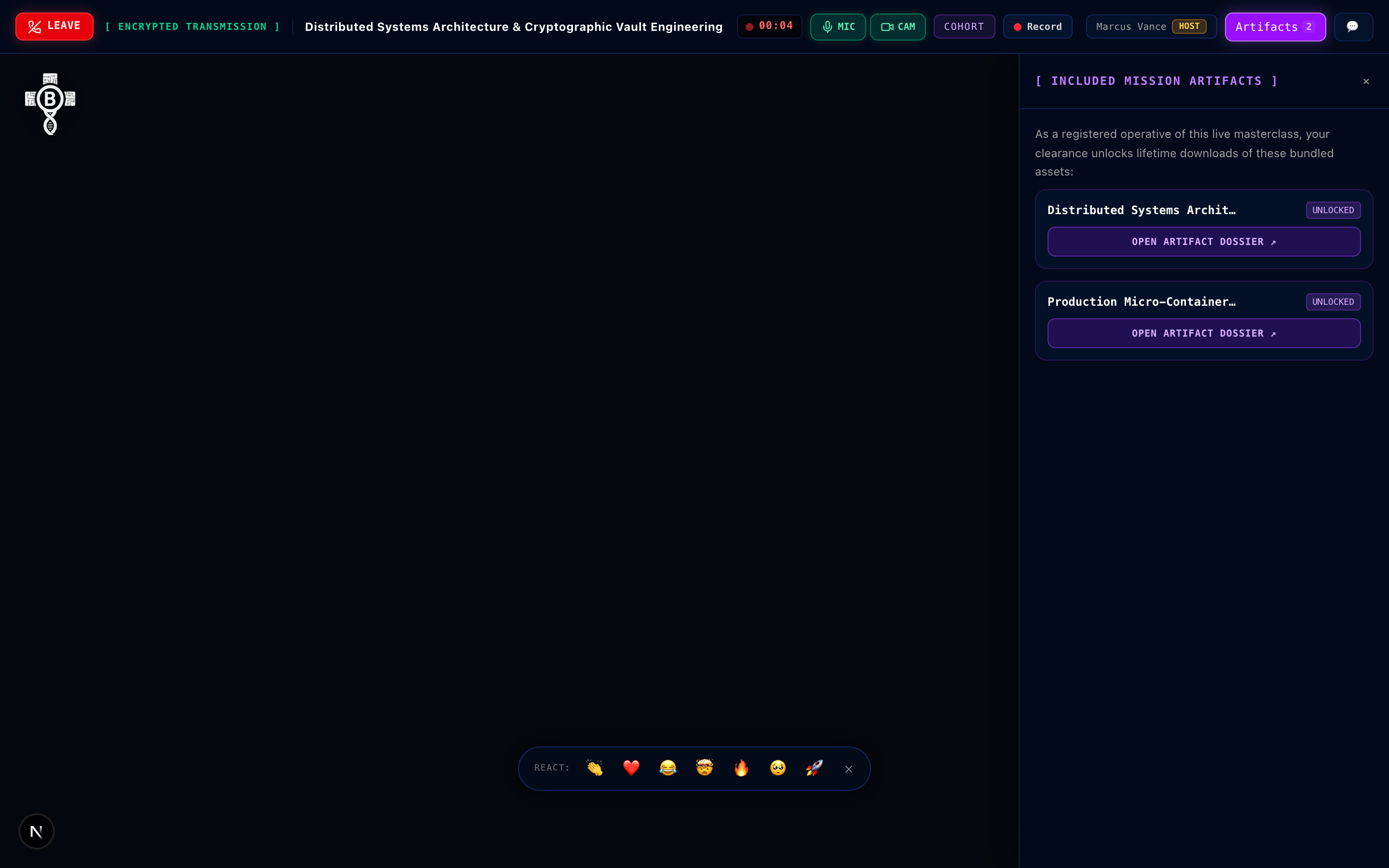
- In-Studio Companion Artifact Deployment: When configuring your webinar in the management screen, you can attach one or more of your own published digital artifacts. When attached to a webinar, registered attendees automatically receive complimentary, free access to these companion materials. Inside the studio, students can open the Artifacts Drawer with a single click to inspect code repositories, system blueprints, or monographs alongside your live transmission.
BinaryBase Academy provides an institutional-grade, multi-currency financial infrastructure designed to maximize international student enrollments while delivering frictionless, sovereign payouts to technical educators.
- Course Directives (75% Creator Cut): Creators receive a 75% net share on all course enrollments. The platform retains a 25% infrastructure share to power high-definition HLS video transcoding, zero-latency WebAssembly sandboxes, Edge-isolated micro-containers, AI lab scaffolding engines, and cryptographic certificate minting.
- Digital Companion Artifacts (90% Creator Cut): For standalone or companion digital artifacts (blueprints, Docker stacks, codebases), creators enjoy full vendor parity with a 90% net share.
Course Enrollment: $100.00 USD (or ₦100,000 / 100 USDC)
  ├── Platform LMS & Compute Infrastructure (25%): $25.00 USD
  └── Creator Net Yield (75%):                     $75.00 USD
Note: When a student enrols via a syndicated Affiliate Partner referral, the affiliate commission (e.g., 15%) is absorbed from the creator's 75% cut (e.g., 75% - 15% = 60% Creator, 15% Affiliate, 25% Platform).
9.2 Universal Multi-Currency Acquiring (NGN, USD, Crypto)
When configuring course directives, creators only set standard NGN and USD prices. The platform automatically coordinates three payment rails based on learner geography:
- Automated Geo-Aware Fiat Routing:
- For Learners in Nigeria & African Regions: The checkout terminal automatically defaults to Nigerian Naira (NGN), payable via direct card, bank transfer, and USSD via Paystack.
- For International Learners Worldwide: The checkout terminal automatically defaults to US Dollars (USD), processed through global Visa, Mastercard, American Express, and Apple Pay merchant acquiring.
- ⚡ Universal Web3 Stablecoin (USDC): Available universally on every course and lesson checkout for all learners globally, automatically pegged 1:1 to your USD price across Base L2, Solana, and Polygon.
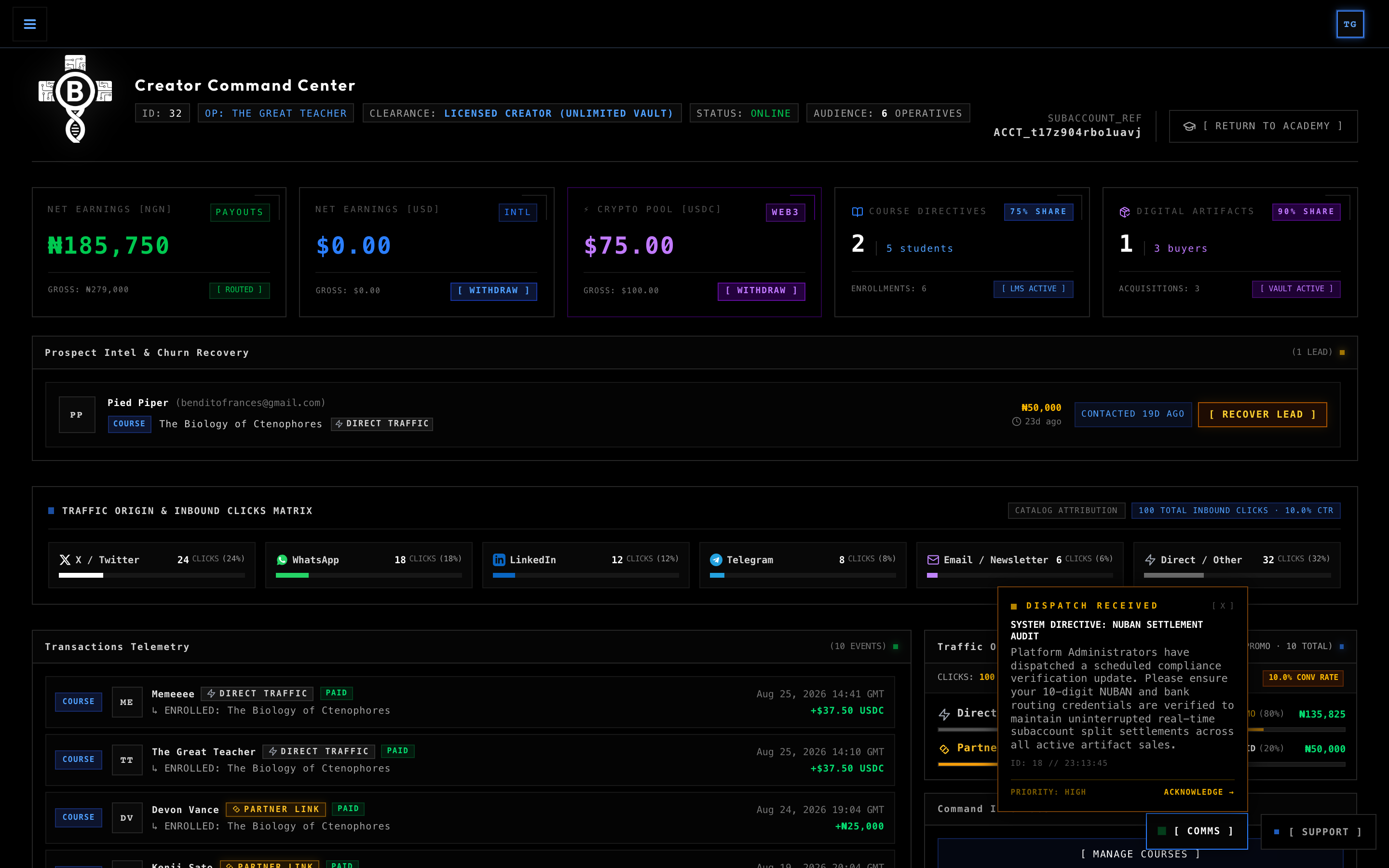
9.3 Realized Net Earnings & Traffic Telemetry HUD
Your Creator Dashboard presents financial performance and traffic acquisition with clear mental separation between cumulative realized earnings, active withdrawable balances, and live channel telemetry:
- Top Financial Metric Cards: Display your Cumulative Lifetime Realized Net Earnings across NGN, USD, and Crypto USDC. This value reflects total net wealth generated on the platform and does not reset to zero when funds are withdrawn.
- Dynamic Pulsing Alert Beacons:
- Pulsing Blue Beacon (`🔵`): Automatically lights up beside your USD earnings when you have unwithdrawn fiat card balances cleared and ready for payout.
- Pulsing Purple Beacon (`🟣`): Automatically lights up beside your Crypto Pool when you have unwithdrawn USDC ready for immediate disbursal.
- Traffic Origin & Inbound Clicks Matrix: Positioned prominently across the Creator Dashboard (situated between *Prospect Intel & Churn Recovery* and *Transactions Telemetry*), this full-width command HUD tracks the exact volume of inbound clicks (
32 CLICKS (32%),24 CLICKS (24%), etc.) across all curriculum channels (Twitter / X, WhatsApp, LinkedIn, Telegram, Email Dispatch, and Direct Traffic), paired with your overall catalog Conversion Rate (CTR %).
9.4 Understanding Holding Buffers vs. Instant Crypto Clearing
To balance zero-fraud security with instant liquidity, BinaryBase separates transaction clearing into two operational pools:
- ⚡ Crypto Pool Buffer (0-Second Hold / Instant Liquidity):
Because on-chain blockchain transactions are cryptographically finalized and carry zero chargeback risk, USDC payments clear instantly. They are immediately credited to your Crypto Pool and available for withdrawal within seconds of sale.
- International Card Buffer (72-Hour Anti-Fraud Window):
International credit/debit card transactions undergo a standard 72-hour fraud and chargeback mitigation window. During this period, funds appear in your transparent Card Buffer. Once the 72-hour window elapses, funds automatically transition into your Total Cleared USD balance.
- Domestic Naira (NGN) Settlements:
Domestic Nigerian payments are settled instantly and autonomously via Paystack direct subaccount splits straight into your registered NUBAN bank account.
9.5 The 3-Rail Treasury Disbursal Engine ([ WITHDRAW ])
When you click `[ WITHDRAW ]` on your USD or Crypto cards, the Treasury Earnings Disbursal Modal opens, allowing you to route your cleared funds across three distinct settlement rails:
🇳🇬 Rail 1: Pan-African Local Settlement (NGN & Mobile Money)
- Channels: Nigerian NUBAN Bank Accounts (GTBank, Zenith, Access, Kuda, etc.) and Pan-African Mobile Money (Ghana MTN MoMo, Kenya M-Pesa).
- Real-Time Verification: Integrated directly with Paystack NIBSS and telecom clearing switches to verify the account owner's legal name before saving.
- Cross-Currency Flexibility: If you earned funds in USDC or USD, you can choose Rail 1 to automatically convert and disburse your earnings as Naira directly into your local bank at mid-market FX rates.
🌍 Rail 2: International USD Settlement
- Channels:
- Grey Tag: Instant, zero-fee internal peer transfer directly to your Grey business account.
- USD Domiciliary: Direct wire to local foreign currency accounts.
- US ACH Direct Deposit: Traditional FedACH routing for US bank accounts.
- UK Faster Payments (FPS): Sort code and account number routing for UK bank accounts.
- European SEPA: IBAN transfer for Eurozone bank accounts.
⚡ Rail 3: On-Chain Crypto USDC Settlement
- Channels: Base L2, Solana, and Polygon.
- Autonomous Hot Wallet Execution: Dispatches on-chain USDC directly to your self-custodial wallet address.
- Cryptographic Verification: Supported by cryptographic checksum validation and public-key verification across EVM and Solana networks, delivering instant on-chain transaction hash receipts via email upon dispatch.
9.6 On-Demand Withdrawals vs. Automated Friday Sweeps
BinaryBase provides complete flexibility over when and how you collect your earnings:
- ⚡ On-Demand Immediate Withdrawals: As soon as your cleared balance reaches the minimum threshold ($5.00 for On-Chain Crypto USDC, $10.00 for International USD & Local Naira), you can click `[ WITHDRAW ]` to disburse your funds instantly to your preferred rail at any time.
- 🔄 Automated Friday Treasury Sweeps: If you prefer to leave your earnings accumulating in your balance, the platform automatically executes a weekly treasury sweep every Friday. All mature, cleared balances meeting or exceeding the minimum batch threshold ($25.00) are autonomously swept directly to your designated primary payout account or wallet without requiring manual intervention.
10. Promo Coupons & Growth Campaign Engineering
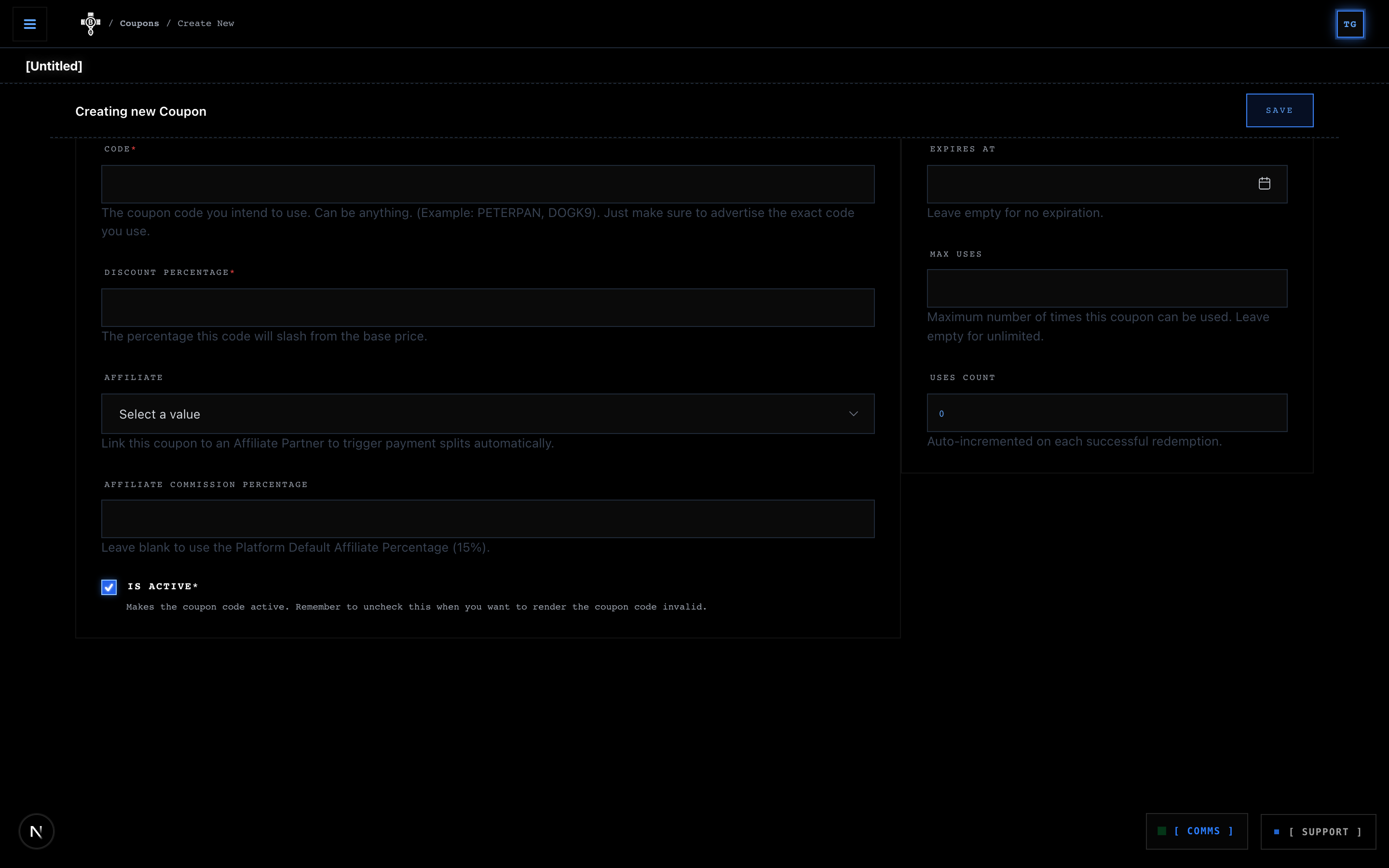
Creators can generate promotional coupon codes to drive launch campaigns, offer scholarship discounts, or incentivise partner channels.
Coupon Configuration Options:
- Coupon Code: Custom uppercase alphanumeric code (e.g.,
COMMUNITY20,LAUNCH50). - Discount Percentage: Percentage slashed from base checkout price (e.g.,
20%,50%,100%). - Max Redemptions: Limit the total number of allowed uses (or leave blank for unlimited).
- Expiration Timestamp: Schedule an automated expiry date and time.
- Affiliate Attribution: Link coupons to specific marketing partners so affiliate sales tracking triggers automatically even without referral link clicks.
11. Prospect Intelligence CRM & The Complete Conversion Funnel
On BinaryBase Academy, curriculum monetization is tracked across a cohesive, end-to-end telemetry funnel:
The Prospect Intelligence Terminal on your Creator Dashboard continuously scans the checkout perimeter to identify abandoned carts (> 30 minutes old) and provides Creators with an automated 1-click recovery tool.
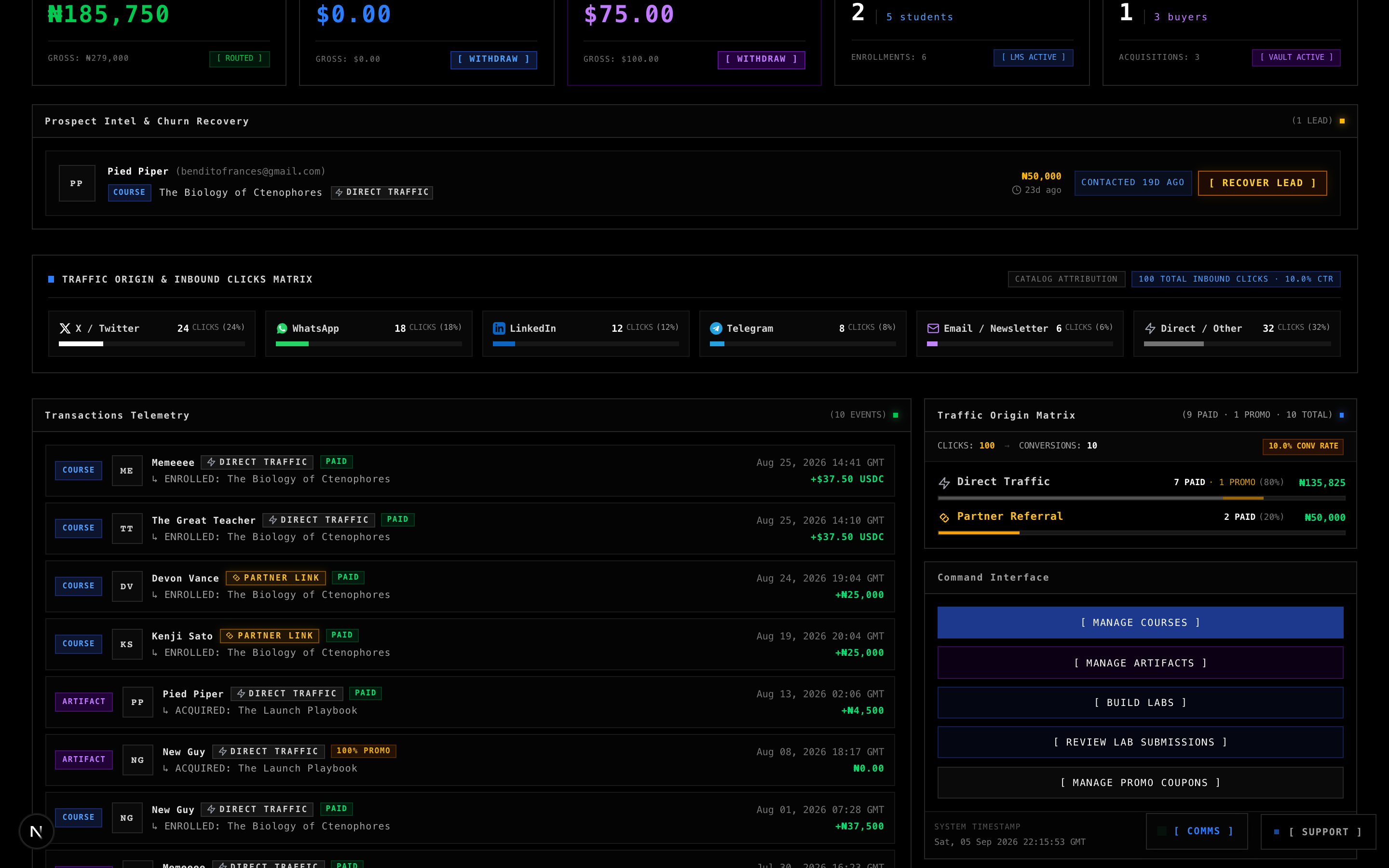
1. Traffic Provenance & Origin Attribution
The terminal tracks exactly where prospective learners arrived from:
WhatsApp: Developer communities and private broadcast channels.Substack / Newsletters: Technical newsletter dispatches.LinkedIn / X: Social media posts and technical threads.Partner Referrals: Affiliate partner traffic.
2. One-Click Churn Recovery Terminal
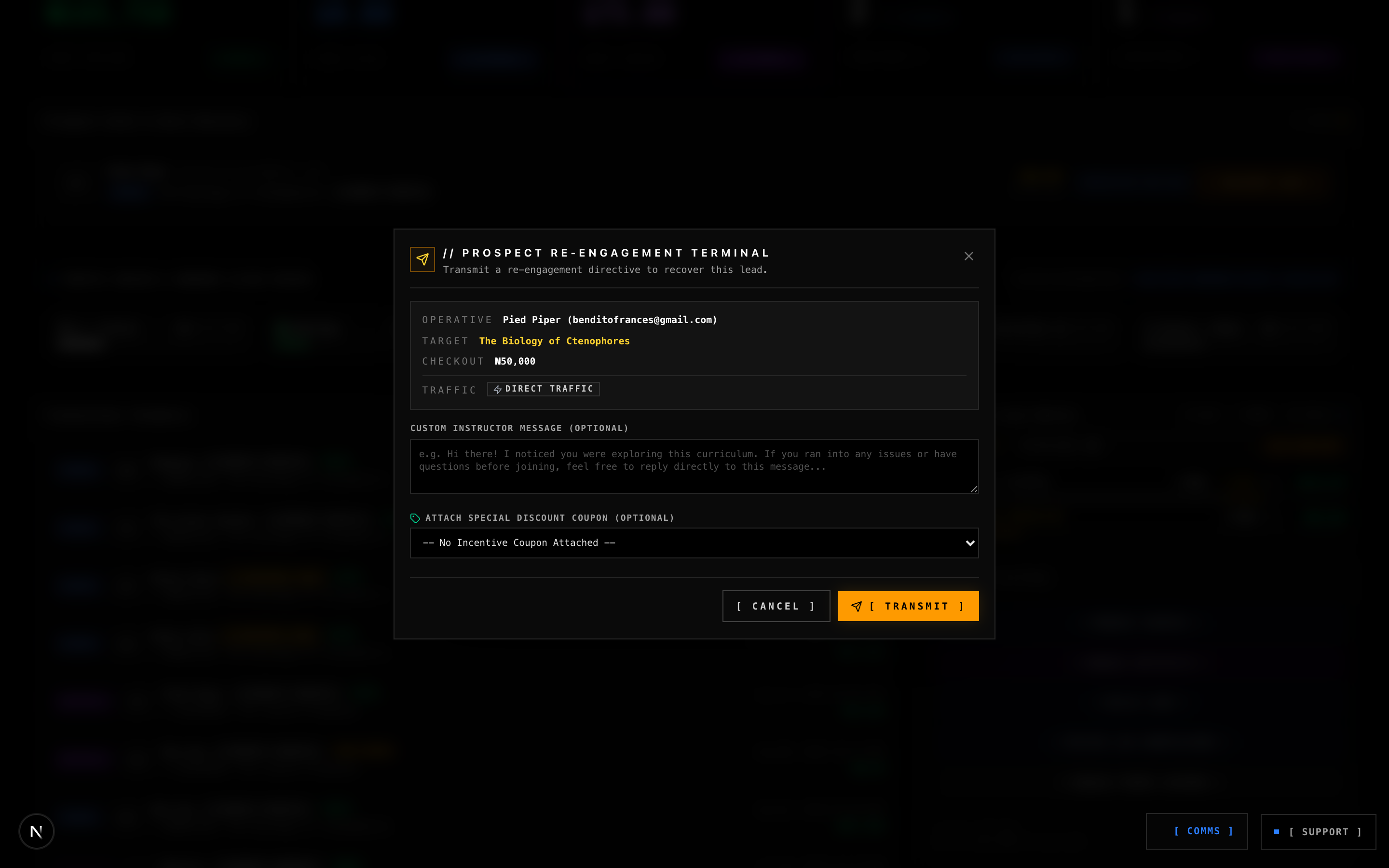
Clicking [ RECOVER LEAD ] opens a specialised recovery modal allowing Creators to:
- Transmit Custom Instructor Messages: Add a personalised note addressing common questions or offering guidance.
- Inject Special Incentive Coupons: Attach a promotional discount code to overcome price hesitation.
- Anti-Fatigue Cooldown: The platform enforces a strict 72-hour re-engagement cooldown per prospect to protect learners from inbox fatigue.
- Autonomous Telemetry Integrity: The underlying click events and attribution records are immutably maintained by the system engine, eliminating manual administrative maintenance while presenting crisp aggregate visuals on your Creator Dashboard.
12. Student Graduation, Enrollment Ledgers & Cryptographic Certificates
As students progress through your courses, all activity is recorded on the real-time Enrollments Ledger.
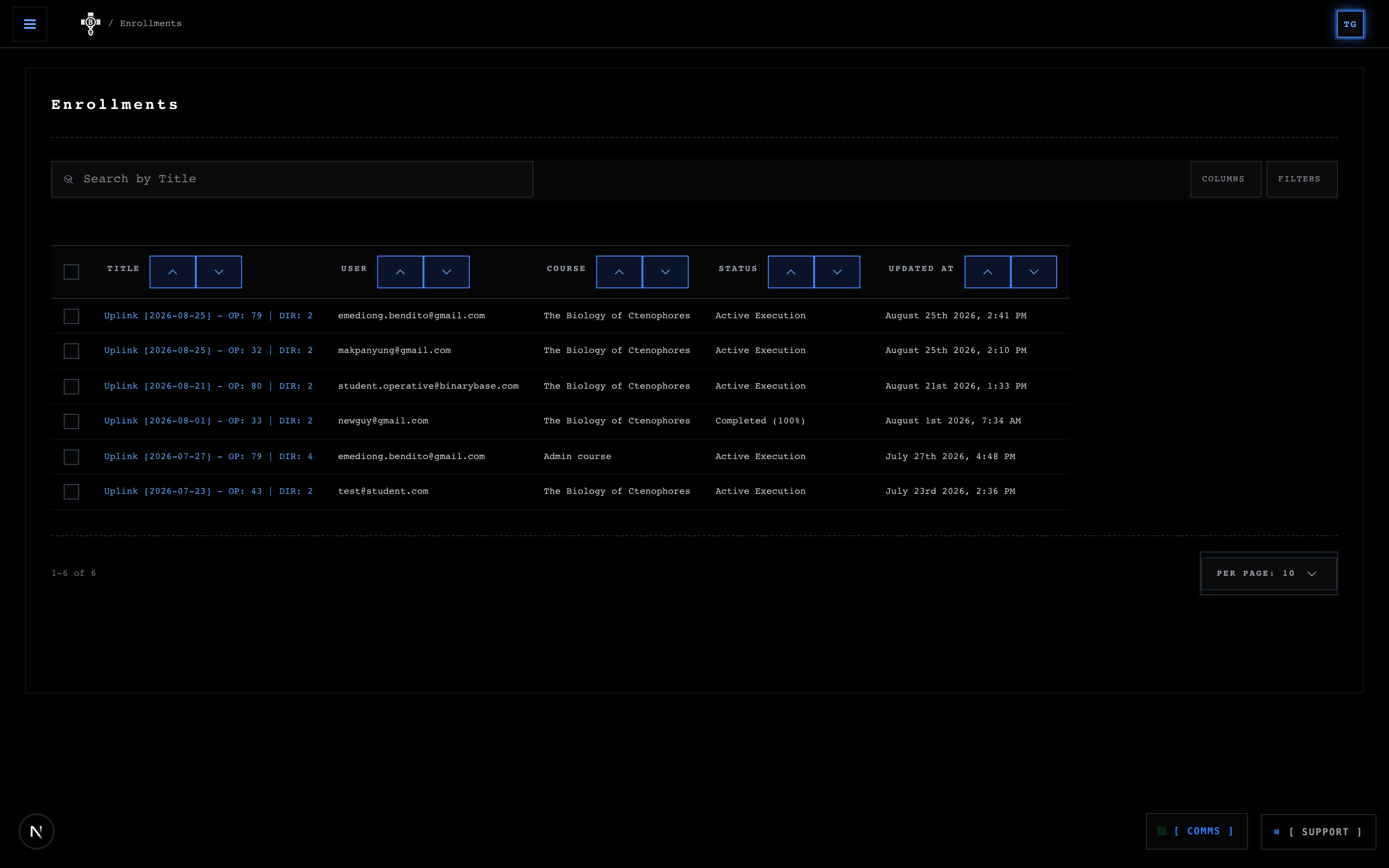
Automated Graduation & Certificate Minting
When a student completes 100% of the lessons, passes all attached interactive coding labs, and clears all formative quizzes, the platform automatically mints an official Graduation Certificate:
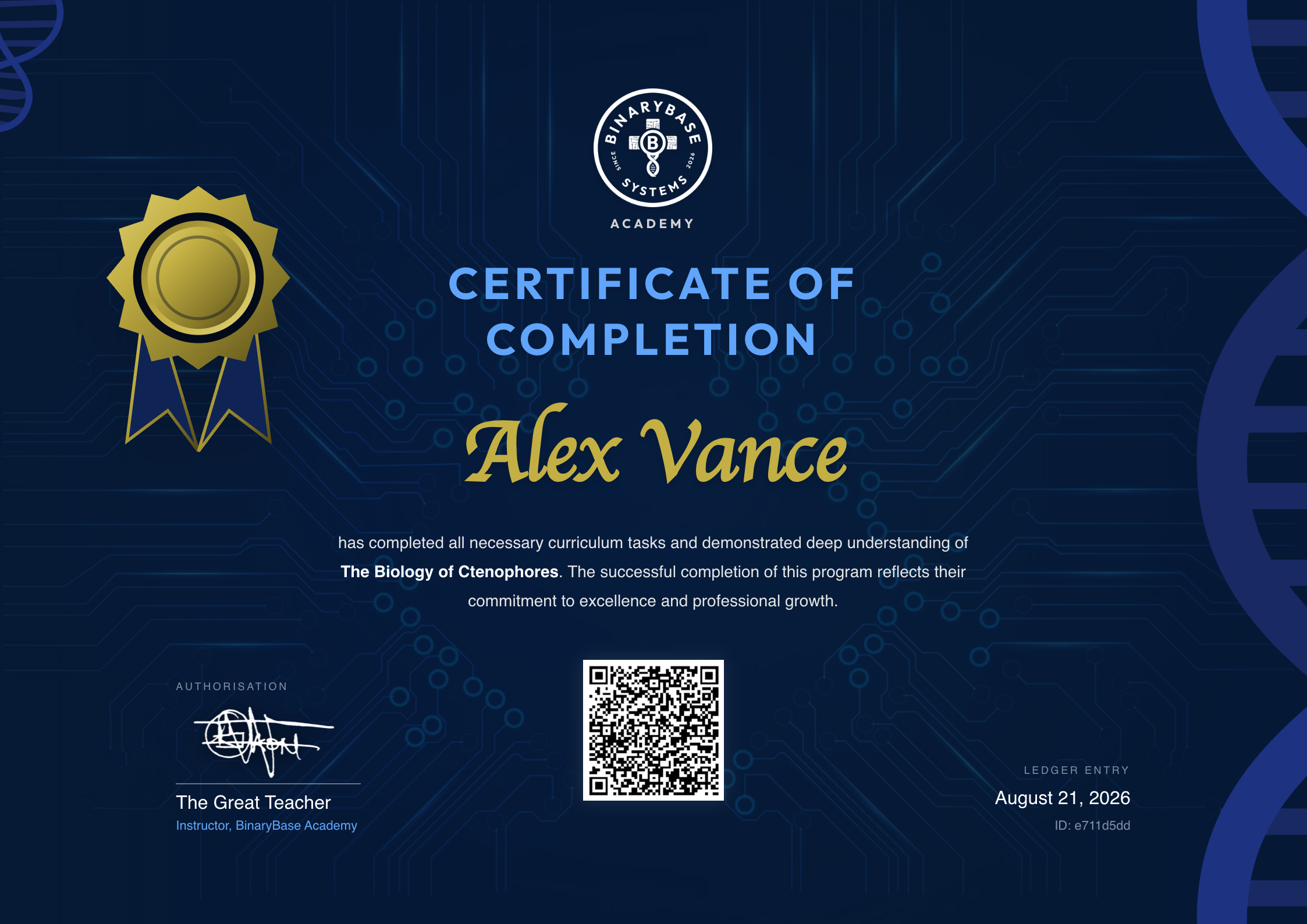
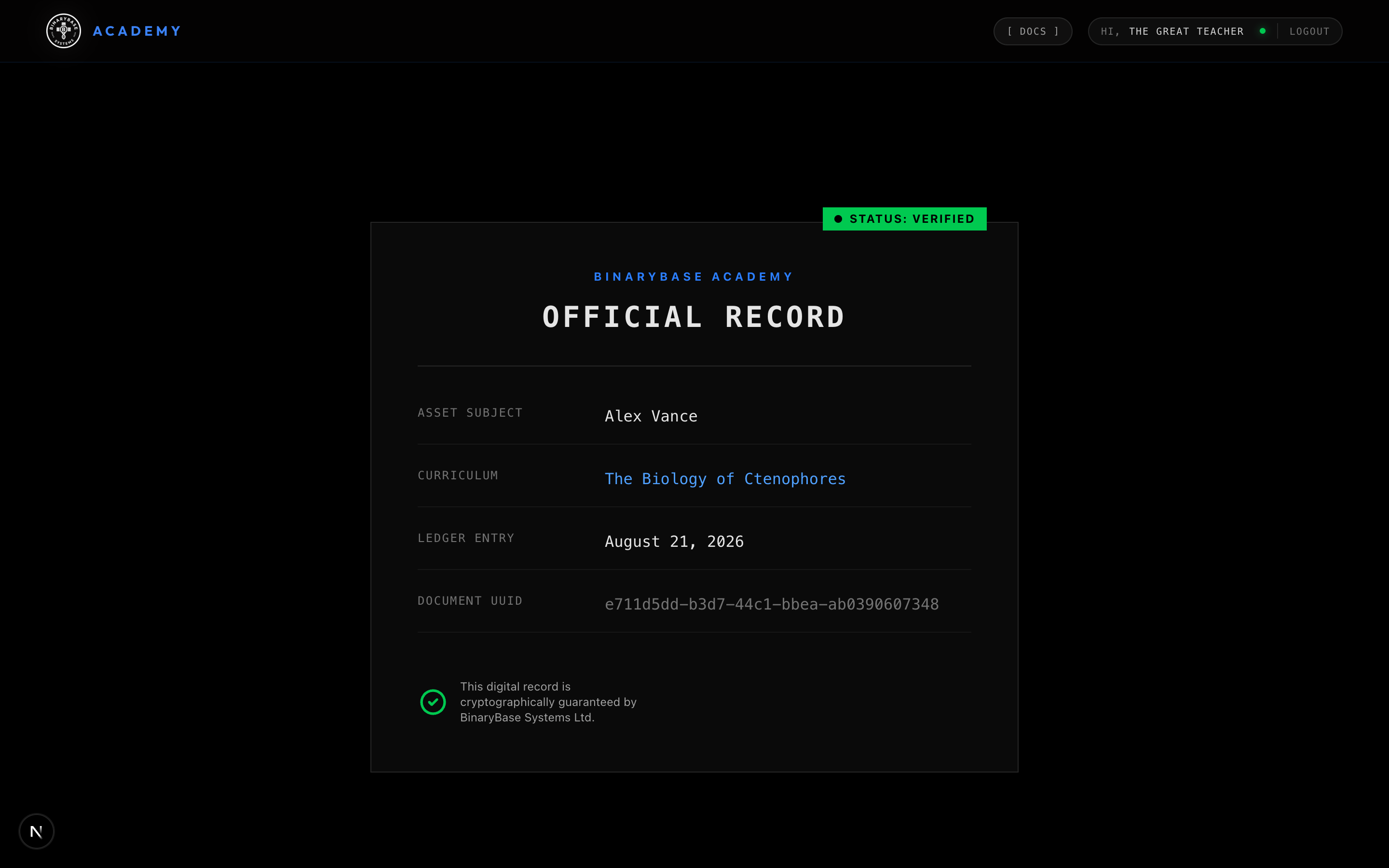
- White-Ink Stamping: The certificate is signed with your verified white-ink signature.
- Cryptographic UUID: Every certificate receives a unique UUID (e.g.,
fc78fe16-2596-4305-a133-63968e4c7f84). - Public Verification Endpoint: Anyone (recruiters, employers, peer engineers) can scan the QR code or visit the public verification URL:
https://academy.binarybase.systems/verify/[certificate-uuid]The verification engine confirms ledger authenticity, displays student clearance status, and provides a high-resolution PDF download of the signed credential.
13. Getting Help: Real-Time Support Dispatcher & Broadcast Communications
Need curriculum engineering assistance, student cohort resolution, or platform guidance? The bottom-right corner of your Creator Command Centre and active lesson environments houses two real-time operational beacons: the Support Dispatcher and the Comms Broadcast Hub.
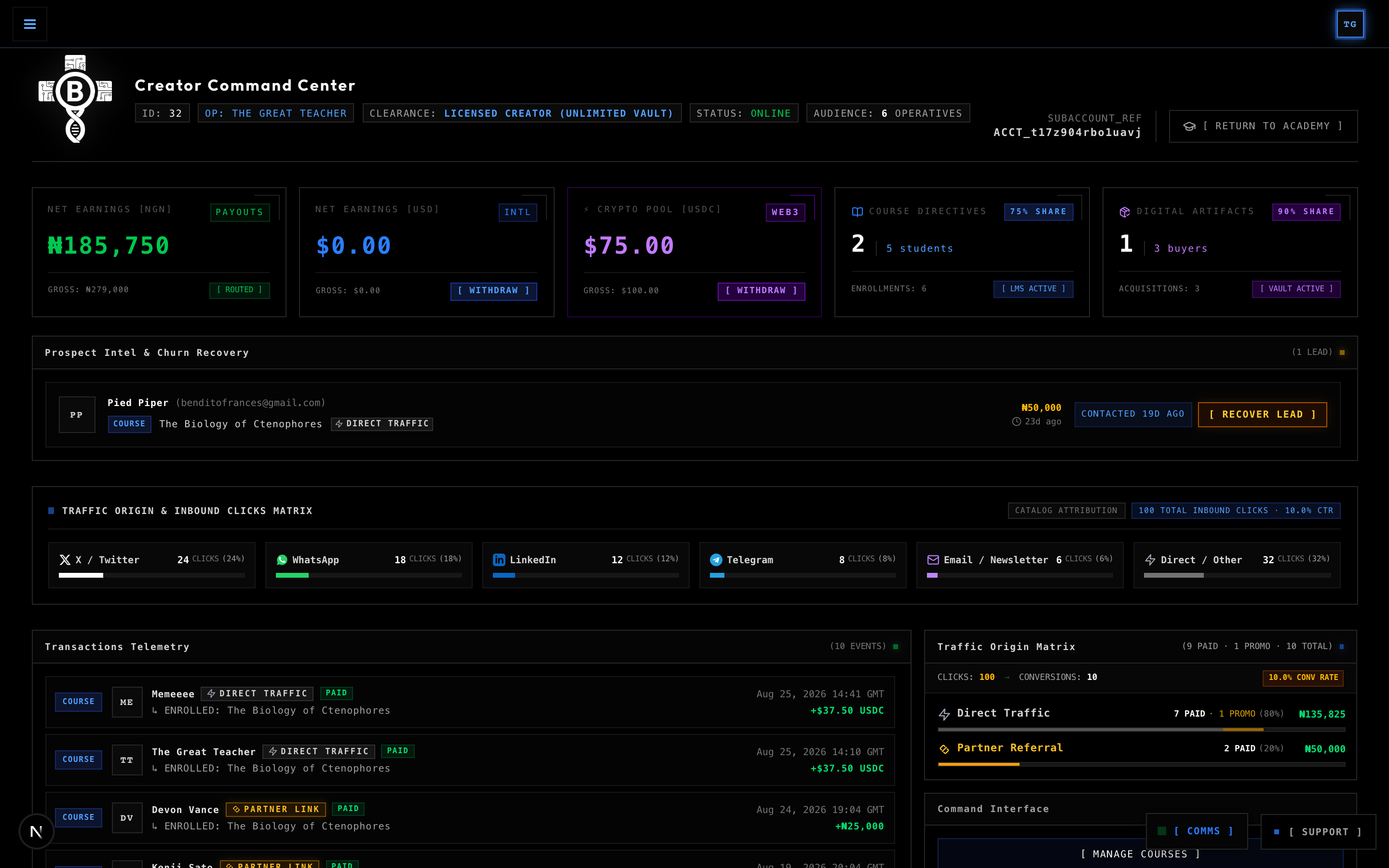
The Support Dispatcher
- Two-Way Pedagogical Support: Click the floating
[ SUPPORT ]widget in the bottom-right corner of your Creator Command Centre or lesson environment to communicate directly with platform support engineers and administrators. - Rapid Green Pulse: When a platform support engineer replies to your ticket, the support beacon rapidly pulses and flashes green to alert you immediately.
- Direct Resolution: Submit technical tickets regarding lab sandboxes, video transcoding, or revenue split reconciliations.
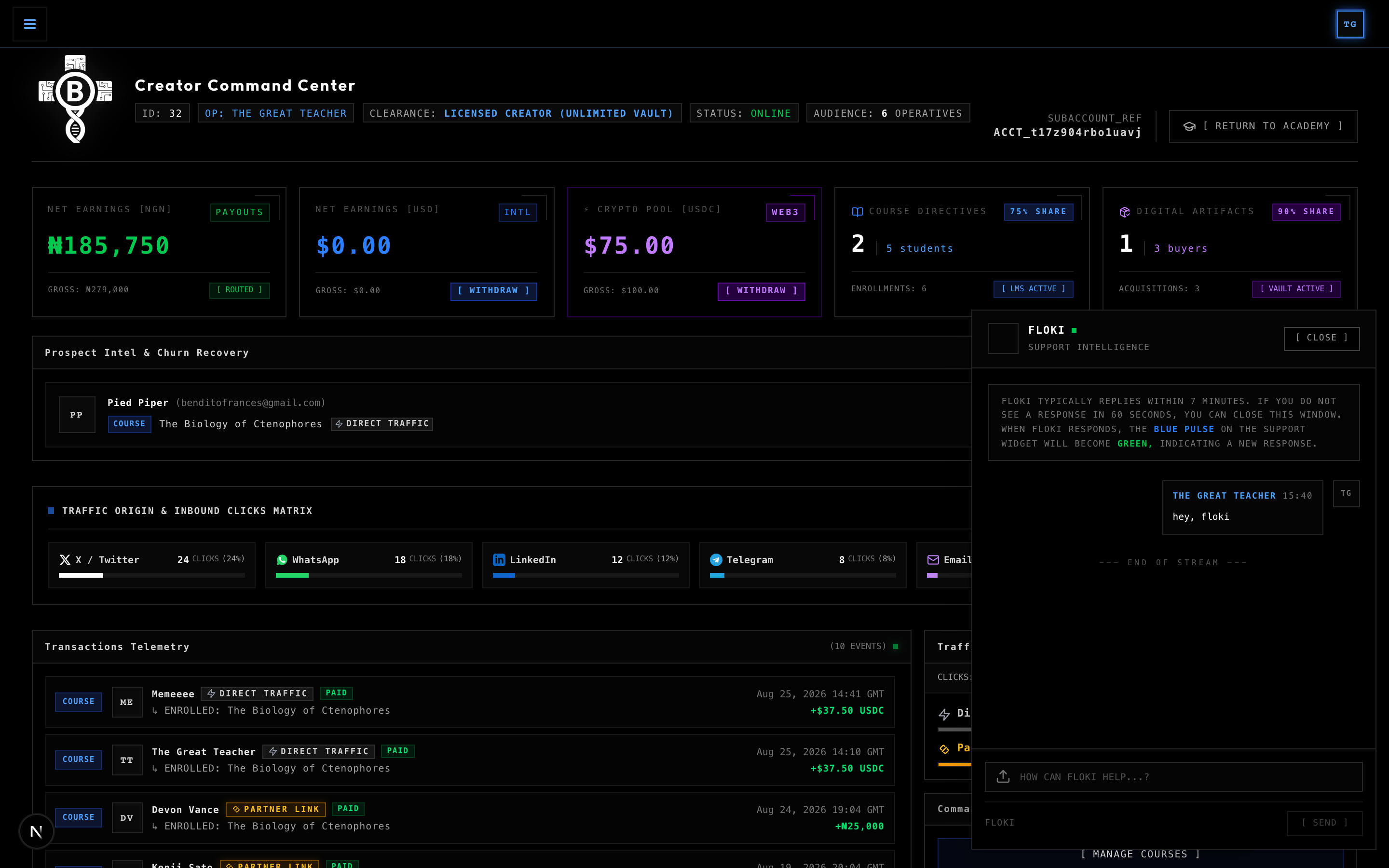
The Comms Broadcast Terminal & Automated Acknowledgement
- One-Way Operational Dispatches: Positioned adjacent to the support widget is the Comms Hub (
[ COMMS ]). This is a dedicated, one-way administrative dispatch channel utilised when platform administrators transmit critical curriculum governance directives, security advisories, policy updates, or system-wide announcements directly to your dashboard. - Incoming Dispatch Alert: When an administrator transmits a dispatch specifically to your creator account, the
[ COMMS ]button rapidly pulses and flashes green to alert you of an unacknowledged transmission. - 1-Click Seamless Acknowledgement: Clicking the flashing beacon opens the Broadcast Dispatch Terminal, displaying the message subject, dispatch priority (
LOW,MEDIUM,HIGH,CRITICAL), full directive message, and unique Dispatch ID. - Automated Support Stream Handoff: Clicking
[ ACKNOWLEDGE → ]automatically marks the dispatch as read, silences the alert beacon, and instantly transmits an official acknowledgement payload into your Support Uplink stream. This enables platform support engineers to immediately see that you have cleared the directive and continue the conversation seamlessly without manual typing friction.
14. Instructor Best Practices & Operational Directives
To maximize student retention, course completion rates, and commercial revenue, adhere to the following directives:
- Lead with Free Previews: Mark your first video lesson and introductory lab as
Is Free Previewso prospective students can experience your instructional quality before purchasing. - Combine Video with Hands-On Labs: Pair abstract architectural concepts with an immediate interactive code lab or formative quiz to reinforce learning.
- Package Companion Digital Artifacts: Bundle production repositories, Docker compose templates, and cheat sheets alongside your curriculum.
- Leverage the Affiliate Marketplace: Set a competitive affiliate commission rate (20%–35%) to recruit top industry creators and technical newsletters to distribute your courses.
- Actively Monitor Prospect Recovery: Review your abandoned checkout queue weekly and send friendly, value-driven recovery notes with targeted incentives.
15. In Conclusion...
Great technical educators do not merely distribute information; they engineer environments where mastery becomes inevitable. On BinaryBase Academy, you have built the ultimate instructional engine: pairing high-definition video masterclasses with isolated sandbox runtimes, automated test benches, and verifiable cryptographic credentials.

Takeaways...
- Bridge Theory and Execution: Combine every theoretical video module with immediate, hands-on sandbox challenges.
- Maintain Zero-Trust Rigour: Leverage AI scaffolding with pre-flight test bench validation to guarantee students execute against robust test suites.
- Scale Sovereign Impact: Empower global cohorts, automate splits with affiliate partners, and mint industry-recognised proof of engineering mastery.